Best Social Media Scheduling Apps in 2026
Compare the best social media scheduling apps in 2026 with pricing, features, and use cases. Find the right tool for your team and workflow.
Social media scheduling apps are now operating infrastructure, not optional productivity tools. One industry summary reports that 73% of marketers use dedicated scheduling tools, up from 61% in 2024 and 47% in 2022, while users manage an average of 5.2 platforms at once and 87% plan at least one week ahead. (SocialCrawl)
That adoption changes the buying question. The right app isn't the one with the nicest calendar. It's the platform that can publish across your required channels, execute enough of the workflow with AI, preserve human approval, and remain affordable as users, brands, and accounts multiply.
Table of Contents
Why Social Media Scheduling Apps Matter in 2026
Early scheduling tools emerged in the late 2000s, when social media became a core marketing channel. The category now covers publishing, approvals, analytics, and parts of creative production across multiple networks. Current market estimates place social media management tools at USD 5,607.4 million in 2026, with a projection of USD 10,378.96 million by 2035 at an 8% CAGR. A separate estimate values broader social media management software at USD 28.58 billion in 2025, projecting USD 62.16 billion by 2030 at a 16.7% CAGR. (Market Growth Reports)
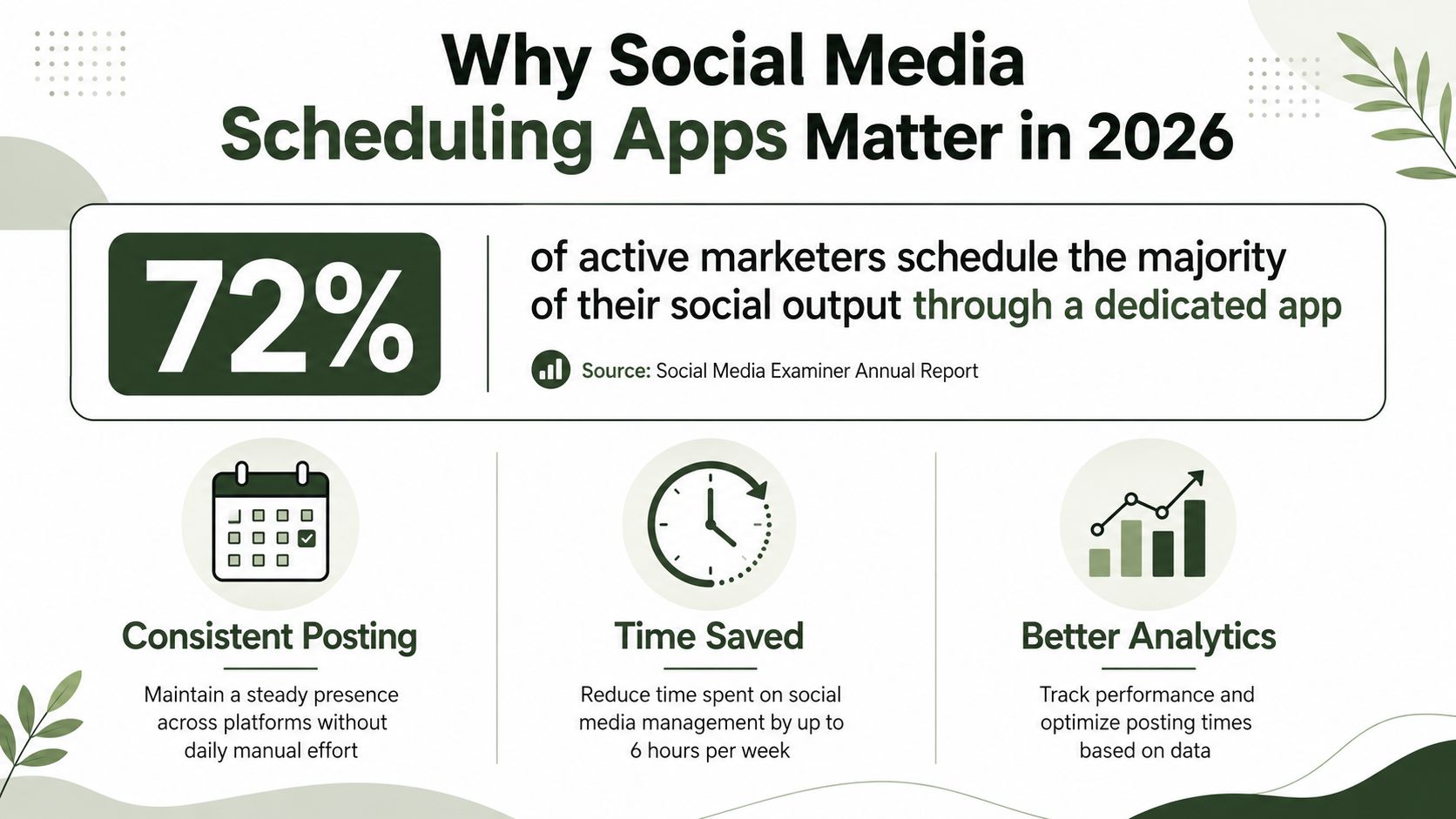
The buying decision is now an operations decision. A scheduling app can reduce manual publishing, route posts through approval, adapt content for different channels, and connect performance data to planning. The question is how much of that workflow it executes reliably, and what the complete system costs after users, brands, channels, reporting, storage, and AI usage are added.
I assess every scheduling platform through three lenses:
- Channel coverage: Does it support the networks your audience uses, with native publishing rather than fragile workarounds?
- AI execution depth: Can it adapt content, generate drafts, plan publishing, and handle repetitive work while keeping a person in control?
- Total cost: What happens when you add brands, users, channels, reporting, storage, and premium AI usage?
A solo founder needs efficient multi-channel publishing and a manageable bill. An agency needs approvals, client separation, reporting, and predictable account costs. A larger brand may accept a higher subscription if it reduces coordination work across teams. Build the decision around the workflow you expect after growth, not the account count you have today. Social media automation is the useful frame because it exposes manual steps that a feature checklist misses.
Scheduling also depends on audience behavior. Sprout Social's 2026 analysis identifies Tuesdays and Wednesdays from 11 a.m. to 6 p.m. local time as the overall strongest window, based on nearly 2 billion engagements across roughly 307,000 profiles. (Webtonic) Instagram requires separate testing. Buffer's 2026 analysis of 9.6 million Instagram posts identified Thursday at 9 a.m., Wednesday at 12 p.m., and Wednesday at 6 p.m. as the strongest times in that dataset. (Jeff Social Marketing)
For campaign planning beyond publishing mechanics, these influencer campaign benchmarks provide context for evaluating creator-led work and performance expectations.
Quick Comparison of the Top Scheduling Apps
Choose a scheduling app by its total operating cost, not its feature count. The bill includes subscription units, AI usage, setup time, approvals, channel adaptation, and the manual work left to your team. A low entry price can become expensive when billing is tied to channels, users, brands, or accounts.
| Decision criterion | Lean scheduler | Workflow-focused system | Crowbert |
|---|---|---|---|
| Pricing model | Low starting cost, often linked to channels or plan limits | Higher subscription tied to users, workspaces, brands, or account volume | Starter, Team, and Agency plans with metered AI usage |
| AI depth | Drafts captions, suggests ideas, and rewrites copy | Supports planning, approvals, adaptation, and selected workflow steps | Autonomous execution with explicit human approval |
| Channel coverage | Core social networks, with limits varying by plan | Broad network coverage and account management | 15 platforms, including Instagram, TikTok, LinkedIn, X, Facebook, YouTube, Threads, Reddit, Pinterest, Bluesky, WhatsApp, and Telegram |
| Human effort | Staff still brief, adapt, review, publish, and report | Reduces handoffs but requires configuration and supervision | Handles more of the path from creation through publishing while retaining approval controls |
| Best fit | Solo operators with a stable publishing routine | Teams managing multiple brands, contributors, or review stages | Teams seeking end-to-end AI-assisted operations |
The practical test is simple. Count every recurring handoff: briefing, drafting, channel adaptation, review, scheduling, engagement, and reporting. Then price the staff time required to complete those steps. A scheduler that costs less but leaves more work in spreadsheets and chat may have the higher total cost.
AI depth also needs a clear boundary. Assisted tools speed up individual tasks, such as caption drafting or rewriting. Workflow systems connect several tasks but still depend on people to move work forward. Autonomous execution can prepare and coordinate more of the process, yet approval rules remain necessary for brand-sensitive or regulated content.
Use a lean scheduler when publishing volume is modest and one person owns the workflow. Choose a workflow-focused system when approvals, account separation, and reporting create the bottleneck. Choose Crowbert when reducing manual coordination across many channels matters more than minimizing the subscription line.
For a focused review of alternatives to a large dashboard suite, see Hootsuite alternatives. The SuperX guide to social media tools offers broader selection context, but test billing units, approval behavior, and AI execution before committing.
Profiles of the Leading Scheduling Platforms
A scheduling app should be judged by the work it removes, not by the number of features on its comparison page. The right choice depends on who owns publishing, how many handoffs content requires, and whether the system stops at posting or continues through review, engagement, and reporting.
For low-friction solo publishing
Use a lean scheduler when one person controls the calendar and publishing volume stays modest. The useful workflow is short: connect channels, add content to a queue, adapt captions, review the calendar, and publish. Clear navigation matters more than advanced permissions or enterprise reporting.
This category fits creators, consultants, and small marketing teams that need consistency without building a formal content operation. AI assistance can generate ideas, draft captions, and rewrite copy, but a person still directs each task. That is acceptable when the same operator owns strategy, editing, approval, and scheduling.
The cost calculation changes as channel count grows. A low starting price can lose its advantage if every additional brand or channel increases the subscription and still leaves planning in spreadsheets or chat. Compare the subscription with the staff time required to maintain the workflow.
For structured review and approval
Choose an approval-focused system when content passes through several contributors before publication. The important functions are assignments, comments, version control, approval states, role separation, and a clear record of who approved what. A calendar alone will not solve a review bottleneck.
This model suits in-house teams with brand, legal, regional, or client reviewers. It also helps agencies separate account access and maintain distinct workspaces. The system should keep channel adaptation inside the workflow, so reviewers do not have to compare scattered documents with scheduled posts.
Review controls add value only when the team uses them consistently. If every draft still moves through email and private messages, the subscription pays for features that do not reduce coordination. Set approval rules before buying, then test a real campaign from brief to publication.
For visual-first planning
Visual teams need a workspace that makes the asset sequence easy to inspect. The useful view shows media, captions, channel placement, and publishing order together. This supports campaigns built around image libraries, short-form video, product launches, or a planned feed appearance.
Select this archetype when creative assets drive the calendar. It is less suitable when the main challenge is formal compliance, complex account permissions, or detailed cross-functional reporting. A visually strong planner does not automatically provide the controls required by a larger organization.
Test the workflow with finished assets, alternate crops, channel-specific copy, and late changes. If the team must export content to another system for approval or reporting, the visual experience is masking a broken process.
For agencies and multi-account delivery
Agency workflows require account separation, reusable processes, client review, scheduled reporting, and predictable access controls. The platform must make it easy to identify the client, campaign, owner, status, and next action without relying on a separate tracking sheet.
A practical system can handle recurring queues, client-facing approvals, publishing, and performance summaries. It does not need every enterprise function if the agency primarily needs dependable delivery across accounts. The key measure is how many manual steps remain after a client approves content.
Price the full operating model. Include internal strategists, writers, account managers, reviewers, and reporting time. A lower subscription can still create a higher total cost if staff repeatedly copy captions, check permissions, rebuild reports, or confirm that approved content was published correctly.
For content discovery and assisted creation
Some teams struggle before scheduling begins. They need topic research, content angles, repurposing, and channel adaptation rather than another empty calendar. A content-focused workflow can help turn a brief into draft material and organize it for later review.
AI is useful here, but its limits must stay visible. Drafts still need brand judgment, factual checks, channel edits, and approval. Treat generated content as work in progress, not as a publishing decision.
This archetype fits teams with a steady need for ideas and repurposed content. It fits less well when the main bottleneck is approval throughput or account governance. In that case, routing and permissions matter more than ideation features.
For enterprise visibility and execution
Large teams need a central operating view across brands, channels, contributors, engagement, and reporting. The system should connect publishing activity with performance context and define access by role. A broad dashboard earns its cost only when multiple stakeholders use that visibility to make decisions.
Enterprise systems also carry implementation costs. Configuration, training, permissions, data connections, and process changes require staff time. Account for that work before comparing subscription tiers. If the team only needs scheduled posts, a large operating system introduces unnecessary overhead.
The practical test is to count every recurring handoff: briefing, drafting, channel adaptation, review, scheduling, engagement, and reporting. Then price the staff time attached to each step.
For end-to-end workflow automation
The strongest fit for automation is a team that wants one system to coordinate several stages, not merely place posts on a calendar. A conventional social scheduler organizes publishing. A workflow system can connect briefing, channel-aware drafting, approval routing, publication, and performance feedback.
AI depth has three useful levels. Assisted tools accelerate an individual task, such as caption drafting or rewriting. Workflow systems connect several tasks but still rely on people to move work forward. Autonomous execution can prepare and coordinate more of the process, while explicit approval remains necessary for brand-sensitive or regulated content.
Choose the automation level that matches the team. One operator with modest volume needs speed and clarity. A team with several reviewers needs workflow controls. A multi-channel operation should prioritize automation when manual coordination is the larger cost than the subscription.
Crowbert's social media scheduling features support that broader sequence, with an AI agent handling work across the workflow while requiring human approval before publication. Use it when reducing repeated coordination matters more than choosing the lowest subscription tier. Examine the full workflow in a real campaign, including revisions, approval, publishing, and reporting, before committing.
Pricing Models and Real Cost Scenarios
The useful pricing question is not the starter-plan fee. It is the operating cost after three brands, five users, and fifteen channels are active. That scenario reveals whether the billing unit matches the way your team works.
A per-channel model charges for distribution breadth. It suits a small team managing several channels with limited reviewer access, but costs rise as each brand expands its footprint. A per-user model fits a compact channel set with many collaborators, then becomes expensive when approvals involve additional participants. A workspace tier model is easier to forecast because users, brands, and channels are grouped into a defined allowance.
A plan plus metered AI usage separates the subscription from execution volume. Review the limits for AI credits, generated assets, extra accounts, and any usage-based features before comparing plans. The entry prices in reviewed tools range from about 5 per channel** to **99 per user per month, and coverage warns that costs can rise as teams add users, brands, or channels.
| Pricing archetype | Best fit | Main cost driver |
|---|---|---|
| Per-channel model | Small teams with a stable user group | Channel count and distribution breadth |
| Per-user model | Teams with few channels and several collaborators | Seats, approval access, and higher-tier features |
| Workspace tier model | Agencies or multi-brand teams needing predictable budgeting | Brands, roles, accounts, and workflow capacity |
| Plan plus metered AI usage | Teams using AI for repeated production or execution | AI volume, premium credits, generated assets, and additional accounts |
Do not create annual totals from incomplete plan rules. Model month six and month eighteen with the current pricing calculator, then include analytics upgrades, extra social sets, storage caps, additional accounts, approval seats, and premium AI credits. This is a total-cost-of-ownership check, not a subscription comparison.
Team size changes the recommendation. A solo operator should prioritize a clear allowance and low administrative overhead. A growing team should calculate the cost of every reviewer, brand, and approval step. A multi-brand operation should price the labor that remains outside the subscription, including creative production, revisions, reporting, and account administration.
Crowbert's transparent pricing structure suits teams that want plan visibility with metered AI tracking. Compare its selected plan and usage assumptions against the full workflow cost. If AI reduces repeated production or coordination work, include that labor change in the calculation. If the team will use only basic scheduling, do not pay for execution capacity it will not use.
Migration, Integrations, and AI Workflow Fit
Migration fails when teams move only the calendar and leave the operating process behind. A clean transition starts with an inventory of channels, brands, queues, approval states, media assets, reporting requirements, and integrations. Then test a small batch before importing the complete library.
What to test before migration
Use a controlled import to verify:
- CSV behavior: Confirm how the new app handles dates, time zones, media references, captions, hashtags, and duplicate rows.
- Native imports: Check whether existing queues, drafts, approvals, and comments transfer or whether only published content can be brought across.
- Asset handling: Test file formats, folder structure, permissions, and storage limits before moving the media library.
- Account reconnection: Reauthorize every channel and document which publishing actions require native confirmation.
Don't assume that bulk scheduling means bulk migration. Some platforms expose bulk endpoints or CSV workflows broadly, while others reserve larger imports, advanced approvals, or API access for enterprise tiers. When native integrations are thin, Zapier or Make can connect a CRM, asset DAM, database, or reporting layer, but each additional bridge creates another failure point to monitor.
An AI agent changes the workflow more substantially than a faster queue. It can turn a brief into a draft, produce channel-aware variants, suggest timing, route content to a human reviewer, and publish only inside an approved window. The human still decides whether the message, creative, claims, and timing meet brand standards.
That operating model is the focus of AI social media management. The important safeguard is explicit approval. Automation should remove repetitive production and handoffs, not remove accountability.
Best Fit by Team Type and Use Case
The right choice depends on where the work gets stuck.
A solo founder running two or three channels on a tight budget needs reliable publishing, simple analytics, and low setup friction. A lean per-channel scheduler is usually the sensible starting point. Don't pay for enterprise listening or elaborate approval chains that only add navigation.
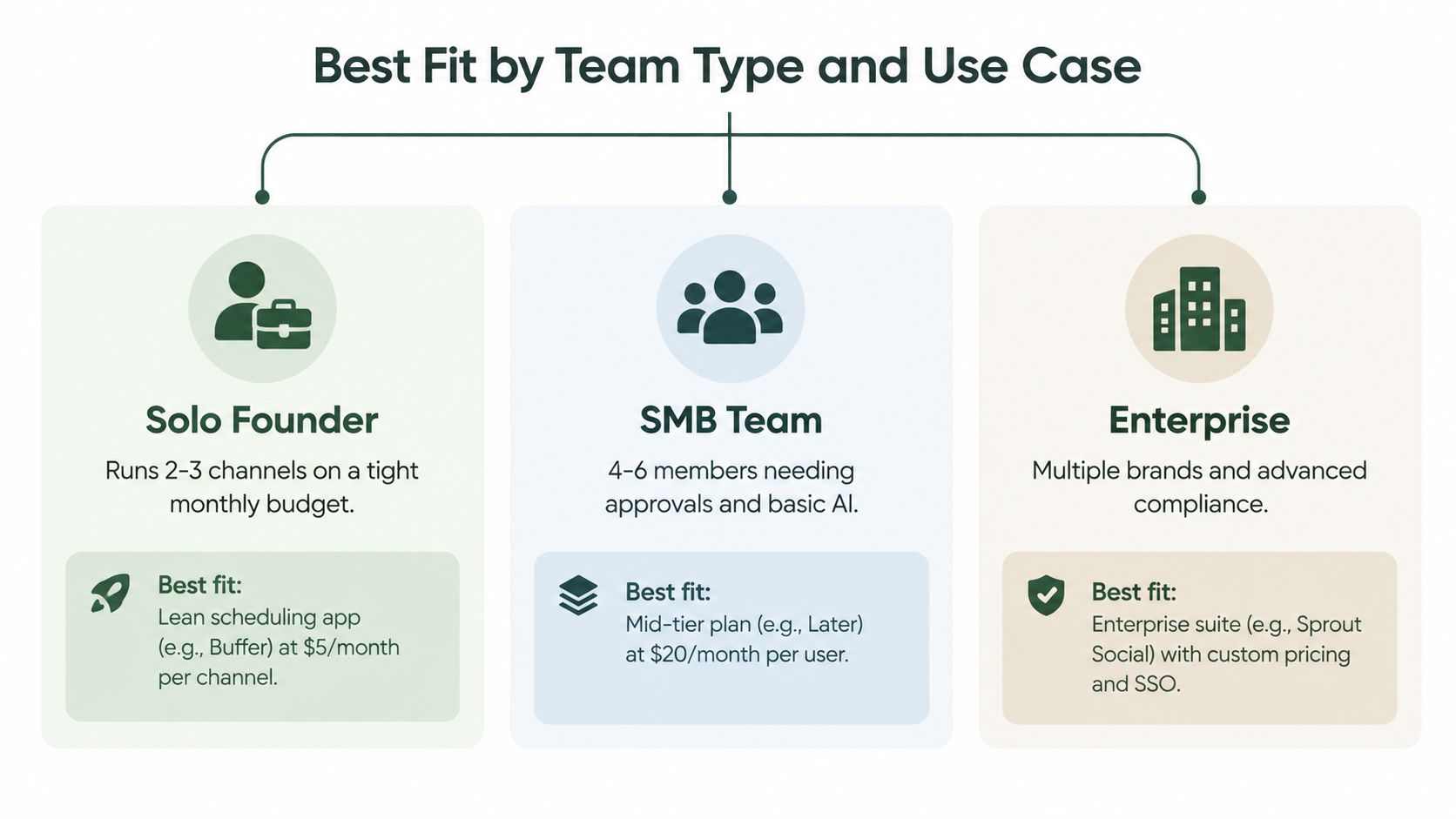
A small in-house team needs shared drafting, comments, approvals, and enough reporting to explain what shipped and what worked. Choose a workflow-oriented platform when content regularly waits for review. A visual-first option fits if Instagram and TikTok dominate. A broader dashboard fits if inboxes, analytics, and several networks matter equally.
An agency should prioritize client separation, approval history, account permissions, and branded reporting before headline AI features. White-label delivery and predictable workspace economics often matter more than the cheapest entry plan. Per-user costs can become uncomfortable when clients, strategists, editors, and approvers all need access.
A creator or influencer team should choose for native short-form video handling, fast caption adaptation, visual planning, and direct control over approval. The best system reduces production friction without flattening the creator's voice.
For a growing brand that wants one autonomous AI agent to generate, adapt, schedule, publish, manage engagement, and report with human approval, Crowbert is a relevant category of solution. It supports a broad channel set and keeps publishing approval in the workflow rather than treating automation as unattended posting.
How to Choose and Frequently Asked Questions
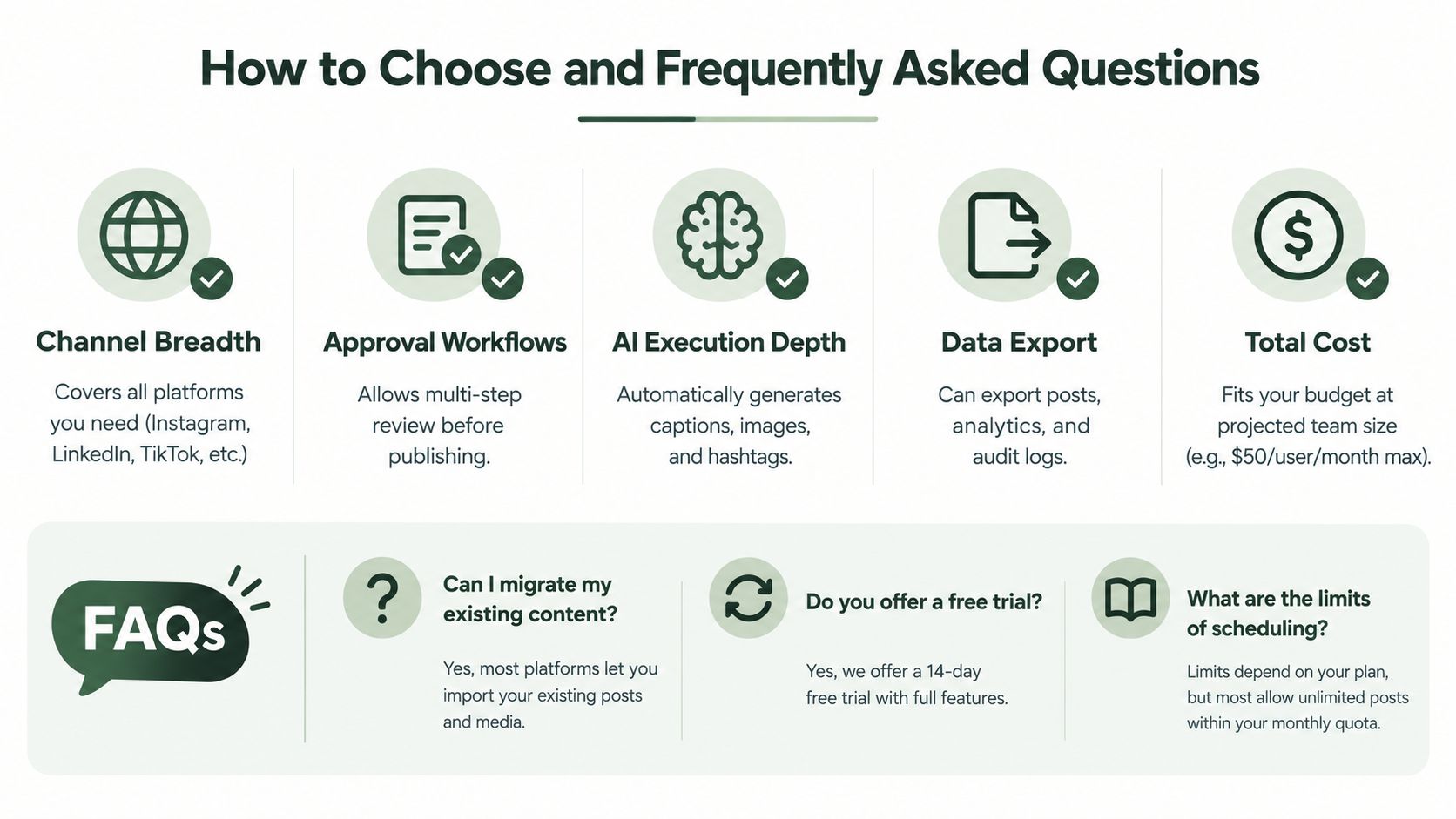
Start with five checks: channel breadth, approval depth, AI execution, export access, and projected total cost. Test real content, not a demo post. Ask who approves, what happens when a platform rejects a post, how assets are stored, and whether the system can preserve brand context.
Frequently Asked Questions
Are free plans viable for multi-brand work? Usually not. Free plans can suit one operator testing a workflow, but multi-brand publishing quickly brings account, user, storage, and approval limits.
How should AI-generated posts be approved? Require a human review step for claims, tone, media, and channel formatting. Autonomous execution is useful only when publishing remains gated by explicit approval.
Will scheduled posts survive a platform switch? Don't assume they will. Export captions and media where supported, then validate dates, formats, links, and approval status in the destination system.
What learning curve should a team expect? Basic scheduling is quick to understand. The longer onboarding work comes from permissions, approval rules, analytics conventions, and integrations.
Which tool suits hybrid organic and paid teams? Choose a platform with strong organic workflow and reporting integrations. Paid campaign management shouldn't force the social team to abandon approval and publishing controls.
Crowbert gives teams an autonomous AI agent for content creation, channel-aware scheduling, publishing, engagement, and performance reporting, while keeping human approval in control. If your current scheduler creates more handoffs than it removes, visit Crowbert and evaluate the workflow against your real brands, users, and channels.
About the Author
The team behind Crowbert building AI-powered marketing tools that help businesses of all sizes create professional campaigns, manage social presence, and drive real results.