Social Media Posting Tools Worth Using in 2026
Compare the best social media posting tools in 2026 for scheduling, analytics, and multi-channel publishing. Find the right fit for your team and workflow.
You open the content calendar and find five different versions of the same campaign. One approval is buried in Slack, a LinkedIn image still needs resizing, the TikTok slot was missed, and the caption copied into X doesn't fit the platform. The problem isn't pressing Publish. It's the broken chain between brief, production, approval, distribution, and learning.
That chain is why social media posting tools have become operating systems for content teams rather than glorified queues. The category began moving mainstream in the late 2000s, when third-party scheduling filled a gap left by major networks without native scheduling. By 2026, content scheduling had become the largest application segment in the social media publishing tools market, representing 38.6% of market share in 2025 within a market valued at 3.87 billion**, with a projection of **9.95 billion by 2034 at an 11.2% CAGR, according to Forbes Advisor's overview of social media management software.
The buyer's question should therefore be more demanding than, “Can it schedule posts?” A useful platform must remove handoffs, preserve human control, adapt content by channel, and feed performance back into the next brief. The framework below judges tools on those seven jobs.
Table of Contents
The Daily Posting Grind: When Briefs, Approvals, and Publishing Don't Connect
At 9:05 a.m., a social manager opens a spreadsheet, a design folder, browser tabs, and a Slack thread containing scattered approval replies. The hero image works on Instagram but needs a different crop for LinkedIn. A campaign caption has been copied into X without adapting its opening. The TikTok slot passes while the team waits for a client comment.
By midmorning, the manager is checking filenames, chasing permissions, moving cards, and reconstructing which version received approval. A founder asks whether the launch post is live. The answer requires another search through messages, drafts, and native notifications.
That workflow breaks at the handoffs. How to manage multiple social media accounts becomes much easier when one system connects the brief, channel-specific draft, reviewer, approved version, publishing time, and follow-up results.
A calendar by itself does not solve the problem. Buyers should require workflow controls that preserve the approved asset, flag missing reviews, adapt content for each channel, and show whether publishing happened.
AI-assisted production can reduce repetitive drafting, repurposing, and formatting. These practical AI marketing tips support using AI for first drafts while keeping brand judgment with a person. Use AI to accelerate production, not to turn every channel into generic copy.
A posting workflow should close five specific gaps:
- Brief gap: Capture the audience, channel, format, objective, and call to action before production starts.
- Production gap: Adapt copy and creative for each network instead of duplicating one post everywhere.
- Approval gap: Show reviewers, deadlines, backups, and escalation rules in one place.
- Publishing gap: Handle queues, time zones, and missed slots without emergency posting.
- Learning gap: Feed results into rescheduling, repurposing, and the next brief.
Judge each tool by the work it completes, not by its feature count. The useful capability groups are multi-channel publishing, format and asset adaptation, approval and role workflows, queue and rescheduling logic, AI-assisted drafting and repurposing, analytics integration, and governance at scale.
What a Social Media Posting Tool Actually Does in 2026
A modern social media posting tool is a control plane for the full publishing lifecycle. It should help a team draft, adapt, review, schedule, publish, and evaluate content without forcing every handoff into a separate application. The established feature set includes content calendars, bulk scheduling, approvals, analytics, and user permissions, as described in Sprinklr's explanation of social media publishing platforms.
Think of the system as four connected layers.
The calendar layer
The calendar shows campaigns, channels, formats, owners, reviewers, and publishing status in one view. It should distinguish an idea from a draft, a draft from an approved post, and an approved post from a published one. Without those states, teams mistake activity for progress.
The format layer
One campaign rarely means one identical post. The format engine should adapt the hook, length, media treatment, call to action, and metadata by network. A vertical video, a professional text post, and a short-form thread can share a central idea while remaining native to their destinations.
The workflow layer
Approval routing assigns responsibility instead of relying on memory. Role-based permissions can separate administrators, editors, authors, and custom roles, while approvals can apply across scheduled channels, as illustrated by Social Champ's publishing feature documentation. That control becomes essential when a post needs legal, client, or brand review.
The measurement layer
After publication, analytics should return to the content system. Reach, impressions, engagement rate, clicks, saves, comments, video views, new followers, profile visits, and website clicks are common measures, according to Buffer's guide to social media analytics tools. The value comes from connecting those signals to decisions, not from displaying more charts.
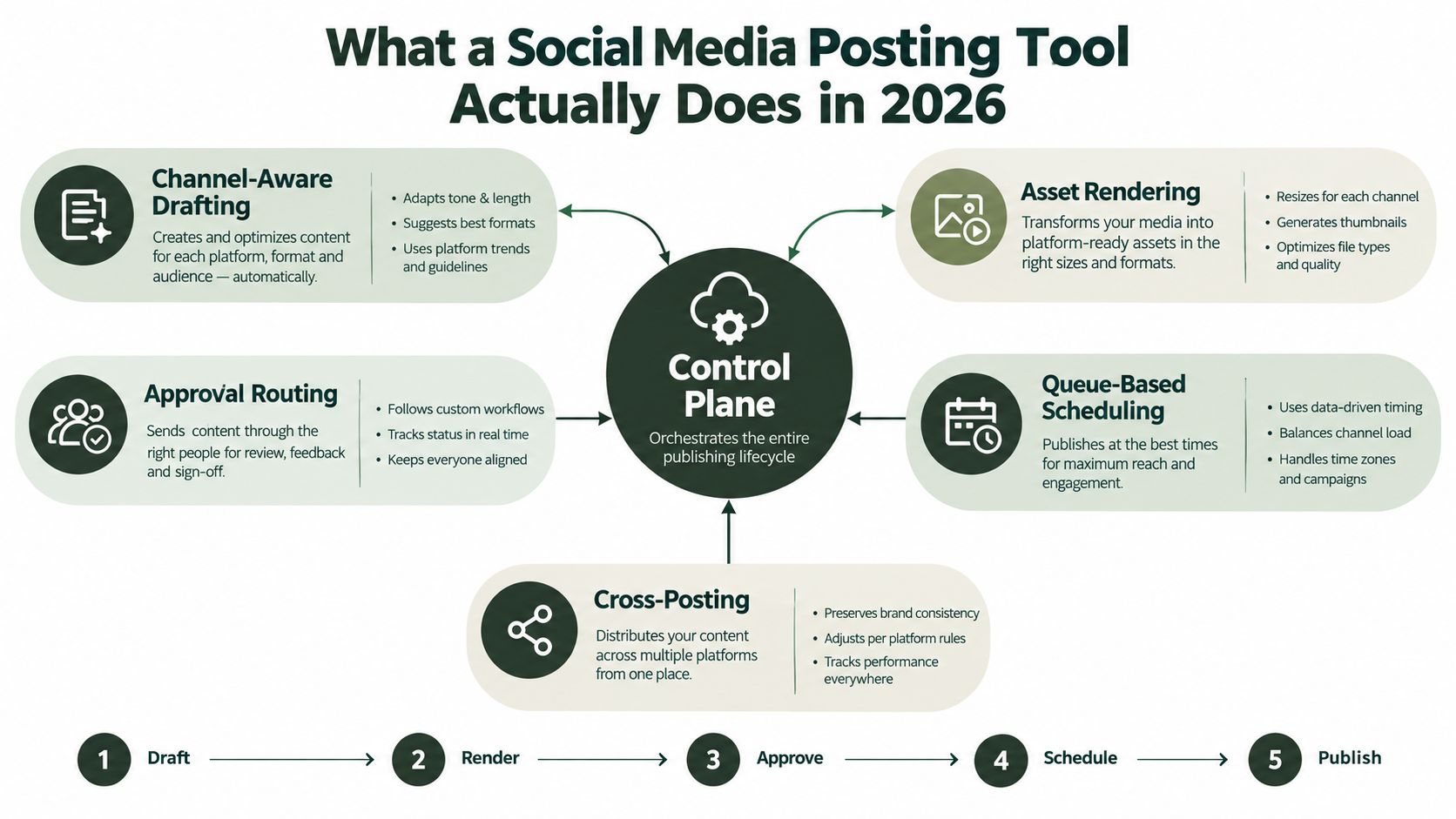
Legacy schedulers mainly stored text and links until a chosen time. A current platform should manage the work before and after that moment. Crowbert's social media scheduling feature reflects this broader model with calendar management, approval flows, auto-publishing, channel-aware formatting, and performance-led rescheduling.
Seven Capability Buckets That Separate the Best From the Rest
A posting tool earns its place by fixing the work that breaks between draft and publication. Score each capability against your team's actual workflow, not against a feature page.
- Multi-channel publishing: Cover the networks your audience uses and give operators one workspace for daily publishing. Dedicated scheduling adoption has increased, while teams now manage several platforms at once, according to ScheduleWave's social media scheduling statistics. Choose a system that reduces account switching without treating every channel as identical.
- Format and asset adaptation: Republish content by adapting it for each destination. The tool should support channel-specific copy, dimensions, media treatments, links, and calls to action. A single approved asset rarely performs well when pushed unchanged across every network. Channel-aware editing protects the original idea while matching how each audience consumes content.
- Approval and role workflows: Assign owners, deadlines, backups, escalation rules, and version control. A “client review” label is not a workflow if nobody knows what happens after a missed deadline. Set routine content on a faster path, then apply stricter review to campaigns, regulated claims, and sensitive announcements. Buyers should test the full approval cycle before signing.
- Queue management: Queueing must handle spacing, time zones, pauses, and missed slots. Bulk scheduling helps with planned campaigns, but capacity and plan limits vary. One major platform supports up to 350 posts at a time on an Advanced plan, while another supports bulk scheduling for up to 500 posts, as documented in Hootsuite's social media tools guide. Treat those limits as operational constraints, not headline features.
- AI-assisted drafting and repurposing: Use AI to turn a brief into channel-ready options, extract themes from previous work, and propose meaningful variations. Keep human review before publication, and reject systems that fill the calendar with interchangeable captions. Crowbert's AI content creation features support copy and creative generation within the publishing workflow, which keeps production closer to scheduling and review.
- Analytics integration: Reporting should change the next publishing decision. A basic dashboard records engagement. A useful system helps the operator decide whether to reformat a post, republish it on another channel, revise its opening, or retire the idea. Connect results to actions, or the reporting layer becomes decoration.
- Governance at scale: Cover permissions, account separation, auditability, data access, naming conventions, and client boundaries. These controls matter when several people publish for multiple brands. Configure the safest path so it is also the fastest path.
Category benchmarks set a demanding baseline. G2-derived reporting places average category adoption at 72%, with an average ROI timeline of 11 months. G2 category data cited in an independent survey reports an average rating of 4.53 out of 5. Review G2's social media management tools roundup and the independent 2026 social media tools survey for the underlying context. Buyers now choose the workflow quality their software can support, not just whether it can schedule a post.
Comparing the Top Social Media Posting Tools Side by Side
A team can choose a scheduler with attractive features and still lose hours to approvals, rewrites, and broken republishing. Compare each tool by the work it removes, not by the number of checkboxes in its feature list. The strongest options handle three jobs well: routing content through the right reviewers, adapting posts for each channel, and helping the team produce useful drafts without removing human judgment.
| Tool archetype | Approval depth | Channel-aware adaptation | Rescheduling logic | AI-assisted production | Reporting value | Best fit |
|---|---|---|---|---|---|---|
| Enterprise suite with deep listening | Multiple roles, permissions, and audit trails | Broad coverage with controlled variations | Rules for exceptions and campaign changes | Integrated drafting and rewriting | Connects performance with audience and campaign signals | Large in-house teams |
| Lightweight queue for solo operators | Simple review or owner approval | Basic variations across core channels | Easy manual changes and queue reuse | Fast caption and idea support | Clear post-level feedback | Individual creators and small teams |
| Visual-first planner | Suitable for straightforward review chains | Strong handling of image and video formats | Calendar-led rearrangement | Creative prompts and draft assistance | Visual performance summaries | Brands led by visual channels |
| Agency workspace | Client, brand, and role-based approvals | Reusable templates with channel-specific edits | Bulk changes with account-level safeguards | Draft support for recurring campaigns | Client-ready operational reporting | Agencies and distributed teams |
| AI-first publishing workspace | Approval gates built into generation and editing | Produces channel-specific versions from one brief | Revises or replaces scheduled content quickly | Strongest support for ideation, copy, and creative variants | Links results to the next content action | Teams with high production volume |
The enterprise archetype earns its place when governance, listening, and detailed reporting drive daily decisions. Its trade-off is complexity. Small teams pay in setup time and unused administration. A lightweight queue suits an operator who owns the whole process, but it becomes restrictive once several reviewers, brands, or exceptions enter the workflow.
Visual-first planners fit teams whose calendars depend on images and short-form video. Confirm that every required publishing path supports the exact format and permissions your channels demand. A visual calendar cannot compensate for a weak approval queue or a manual republishing process.
Agency workspaces should separate clients, preserve drafts during account switching, and show who approved each version. Bulk publishing saves time only when the system keeps channel-specific edits intact. A single caption copied everywhere may schedule quickly, yet it still creates extra revision work and weakens the post on channels with different audience expectations.
AI-first workspaces reduce the gap between idea, draft, adaptation, and review. Choose this class when production volume is the constraint, then require clear controls for brand voice, factual review, asset selection, and final approval. Teams producing substantial visual output should also consult this content creation tools guide to decide whether the bottleneck sits in creative generation, adaptation, or publishing.
Test failure points before signing up. Confirm the supported TikTok publishing mode, the depth of LinkedIn reporting, draft retention during client switching, and whether approvals form a real queue instead of a comment thread. Check how the system handles a rejected post, a missed deadline, a changed campaign, and a version that needs different copy for each channel.
Use Crowbert's workflow-focused comparison page to turn those jobs into a shortlist and compare requirements before a trial. Choose the tool that removes the most manual handoffs while keeping reviewers in control.
Setting Up a Posting Workflow That Actually Ships
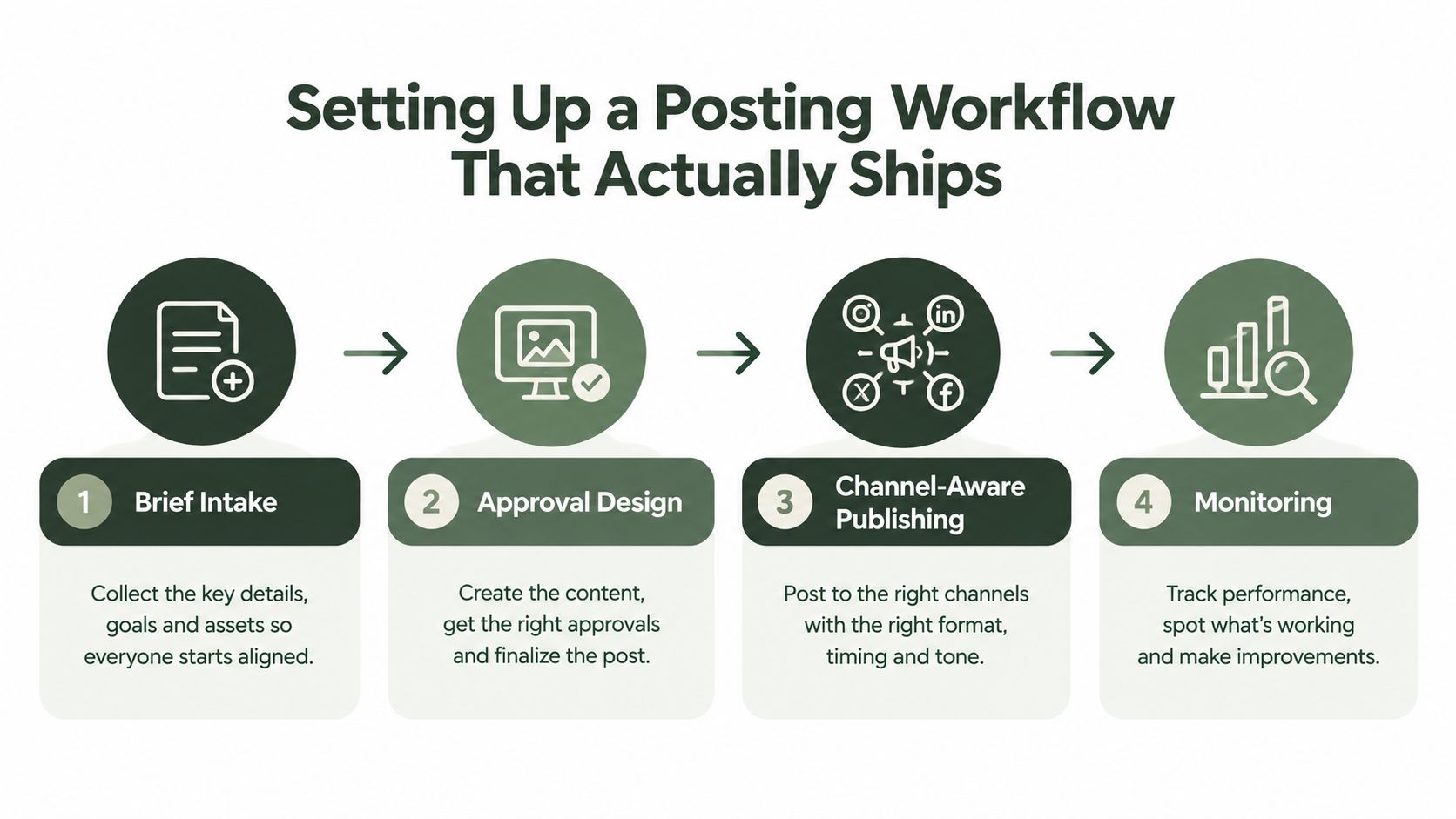
Pick the tool after defining the operating rules. Otherwise, the team imports its old spreadsheet habits into a new interface and calls the result automation.
Start with a complete brief
Every request should record the audience, objective, channel, format, offer, supporting asset, call to action, owner, reviewer, and target date. A brief that says “promote the webinar” forces the writer to ask basic questions later. A brief that names the audience and desired action gives the drafting system enough context to produce useful options.
Set standards before production begins. Define the accepted voice, platform-specific length, media ratios, link rules, UTM conventions, and accessibility requirements. Name assets consistently so a reviewer can identify the campaign, channel, version, and status without opening every file.
Design approvals by risk
Use peer review for routine posts and manager sign-off for campaigns, launches, claims, and sensitive topics. More reviewers don't automatically create more safety. They often create a slower queue unless the workflow assigns a decision owner, a deadline, and a backup.
The approval policy should state what happens when someone misses the window. The post might move to a backup reviewer, return to the owner, or pause automatically. Document that path before the first urgent campaign. Teams handling account verification or other operational access should also keep those procedures separate from content approvals, using a clearly documented resource such as Quackr's numbers for account verification where appropriate.
Publish by channel, not by duplication
Create one campaign concept, then produce channel-native versions. Re-caption the idea for each audience, resize or re-render the asset, set a channel-specific call to action, and retime publication when performance or audience behavior supports it. Pin the operating time zone and decide how queue spacing prevents several posts from competing for attention.
Close the loop every week
Review the slowest approval stage, missed slots, rejected drafts, rescheduled posts, and top-performing formats. Feed those findings into the next brief template. Analytics should answer an operational question, such as whether a post deserves a new format or whether a recurring approval delay needs a different owner.
Use the guide to posting on social media as a practical reference when documenting the team's publishing standards. The best workflow is visible enough that a new operator can follow it without asking who owns each step.
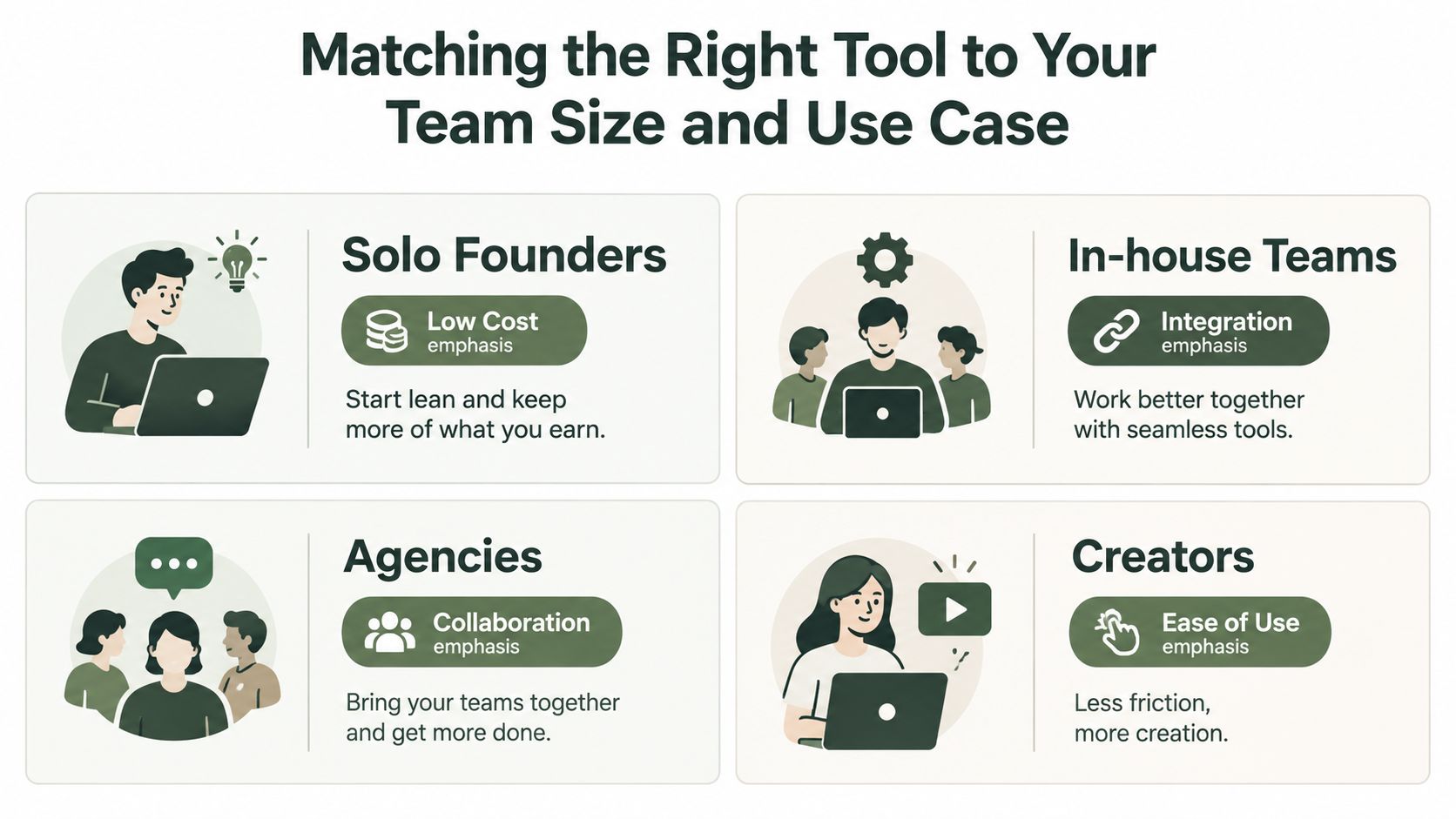
Matching the Right Tool to Your Team Size and Use Case
The correct tool depends on where work breaks, not on how many features appear in a product tour.
Solo founders
A solo founder needs low friction, quick drafting, dependable queueing, and enough AI support to avoid staring at a blank calendar. Don't pay for enterprise governance before you have a review problem. A simple scheduler or an entry-level agency-oriented tool usually fits better, provided it supports the channels you use and doesn't make platform adaptation cumbersome.
Your decision rule is simple: prioritize fast production and queue maintenance. Analytics should help you identify what deserves another version, not create a second job.
In-house teams
Small and mid-market teams need shared calendars, permissions, approval ownership, and reporting that connects social activity to wider marketing work. The team has enough people for handoffs to matter, but not enough capacity to absorb unclear ownership.
Choose workflow depth over an attractive visual calendar. If a campaign requires brand, legal, and product review, the tool must show who is blocking publication and preserve the approved version.
Agencies
Agencies need isolated client workspaces, role-based access, reusable templates, reporting, and a clear path from draft to client approval. White-label reporting matters when the agency delivers recurring results, but it shouldn't distract from client switching limits, account separation, and escalation rules.
Agency buyers should evaluate whether the tool supports collaboration without forcing every client into the same calendar logic. A lower subscription price is meaningless if account changes, approvals, and reporting require manual work.
Creators and visual brands
Creators often need a visual calendar, media organization, preview accuracy, and dependable support for video-heavy channels. A visually polished tool can be the right answer when Instagram and TikTok dominate the workload. It becomes a poor fit when the creator also needs serious LinkedIn, YouTube, or multi-client governance.
For teams preparing launches, the decision is even clearer. If you bill clients or run campaigns with legal review, prioritize approval depth. If you ship daily content alone, prioritize queueing and AI speed. Crowbert fits teams that want an autonomous AI agent to create, adapt, schedule, publish, and report across channels while keeping explicit human approval before anything goes live.
Buyer Questions That Decide the Final Shortlist
How much time can a posting tool save?
Use the category benchmark as a starting point, not a promise. Scheduling tools are reported to save an average of 6.3 hours per week, or about 328 hours per year, compared with manual posting. Teams using them also publish 2.6 times more content per week without a proportional increase in labor hours, according to ScheduleWave's scheduling data. Track drafting, resizing, approvals, publishing, and reporting separately so your team can see where the gains come from.
Should pricing be per seat or per channel?
Per-seat pricing suits teams where collaboration and approvals drive the workload. Per-channel pricing can suit solo operators managing several networks, but costs become harder to forecast as the calendar expands. Compare users, profiles, AI usage, reporting, approval controls, and client workspaces. The entry price rarely reflects the full operating cost.
Can approvals scale beyond two reviewers?
They can, provided the tool supports roles, deadlines, backup reviewers, version history, and escalation. A comment thread does not replace an approval workflow. Test routine content, a campaign asset, and a missed deadline before buying. Make sure the system preserves who approved which version and prevents unapproved revisions from reaching publication.
What does analytics integration add?
Integrated analytics turns reporting into an action loop. Your team can compare formats, channels, and campaigns, then decide whether to repost, reformat, retime, or suppress content. Check for reach, impressions, engagement rate, clicks, saves, comments, video views, follower growth, profile visits, and website clicks. Each metric needs a clear definition, especially when reports combine data from different channels.
Can a free plan support real publishing?
Free plans work for experimentation and a narrow cadence. They often restrict reviewers, channels, queue length, reporting, or version control. Run the exact weekly workflow before treating a free tier as your operating system. Include drafting, channel-specific adaptation, approvals, publishing, and analytics.
AI should remain inside a human review loop. Use it to generate variations, identify repurposing opportunities, and prepare channel-specific drafts. A person must approve claims, tone, creative, timing, and final publication. Confirm how the vendor handles workspace data, exports, retention, and term changes before moving historical content into the system.
Crowbert provides an autonomous AI agent for content creation, channel-aware adaptation, scheduling, publishing, engagement, and performance reporting, with human approval required before posts ship. Visit Crowbert to assess its workflow against your team, channels, and approval requirements.
About the Author
The team behind Crowbert building AI-powered marketing tools that help businesses of all sizes create professional campaigns, manage social presence, and drive real results.