Content Briefing Template That Actually Works in 2026
A practical content briefing template with fields, examples, and a checklist your team can copy. Built for social media workflows and AI agents.
You've probably seen this happen: the strategy deck says one thing, the writer interprets it another way, and the social team receives a post that no longer matches either. The audience shifts, the call to action gets softened, the approval owner is unclear, and a simple asset spends days moving between comments, messages, and revised documents.
A content briefing template fixes that only when it functions as more than a keyword worksheet. It needs to preserve the decision behind the content, specify the execution, and give people or systems a reliable record of what was approved. The template below treats the brief as an operational contract, then carries the same structure into human review and an autonomous AI workflow.
Table of Contents
Why a Content Briefing Template Is the Contract Between Strategy and Execution
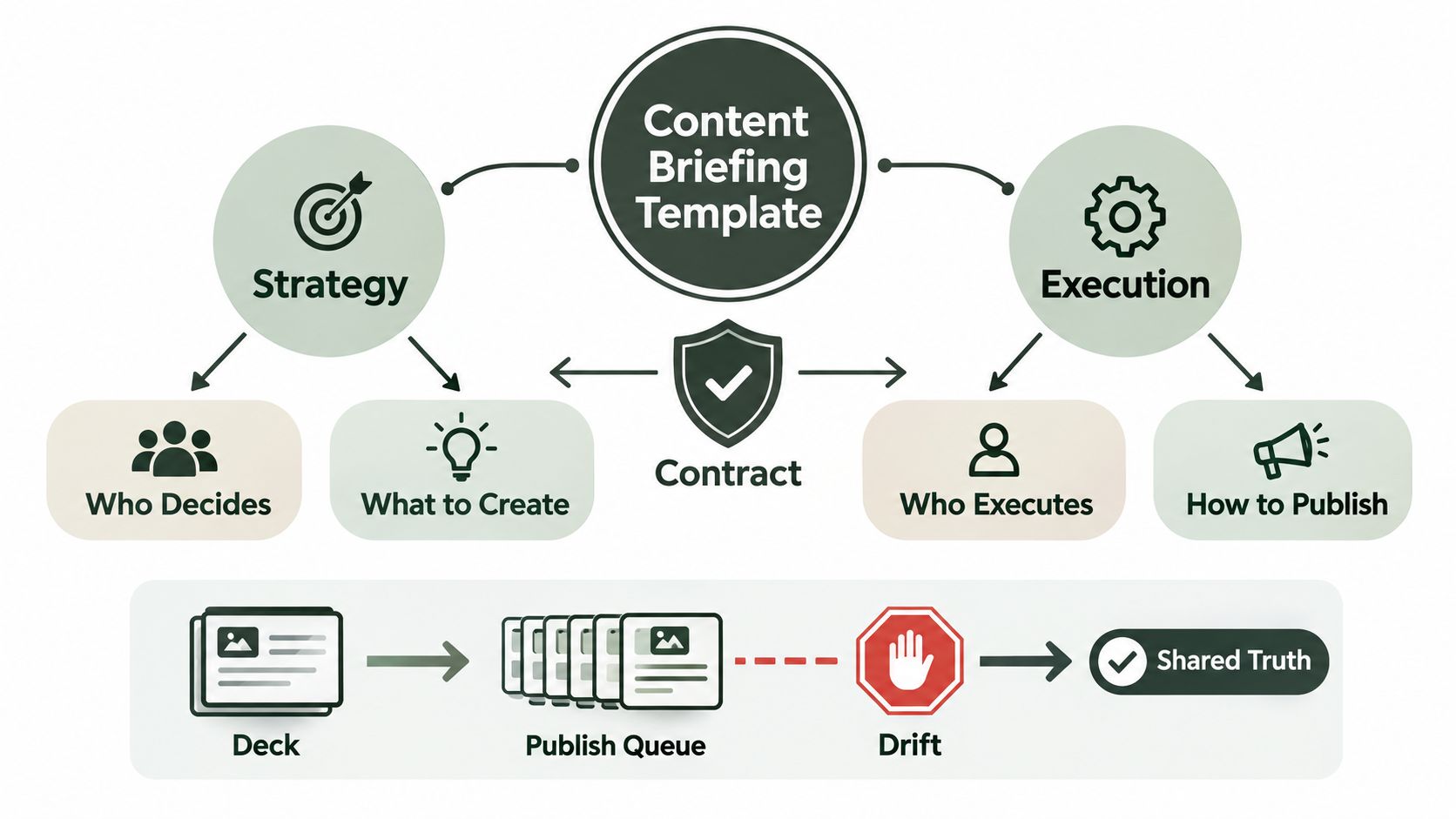
A strategy document explains direction. A production team needs decisions. The brief is the artifact that connects the two, so it must state who decides what, who executes it, and what conditions must be met before publication.
Without that shared record, every writer, editor, designer, and channel owner fills in the gaps personally. The result is predictable: tone fractures across formats, a conversion CTA changes midway through the funnel, and approvers review different versions of the same idea. A documented brief gives the team one reference point instead of asking everyone to reconstruct the strategy from meetings and scattered messages.
A 2022 bibliometric review in the International Journal of Consumer Studies synthesized 112 content-marketing research items published between 2015 and 2021, using the TCCM framework to map theory, context, characteristics, and methods (the review and its research context). That matters operationally because briefing has moved from informal practitioner knowledge toward a more structured discipline. The template is the practical expression of that shift.
Three failures the contract prevents
- Missing audience definition: “Small businesses” doesn't tell a writer what the reader knows, fears, or needs to decide. A useful persona identifies the role, situation, pain point, and desired next step.
- Unfalsifiable success metrics: “Build awareness” gives nobody a clear review standard. The brief should name one primary outcome and the signal that indicates progress.
- Undocumented constraints: Legal restrictions, approved terminology, banned claims, accessibility requirements, and brand voice guidance must appear in the working document, not only in someone's memory.
Content pillars can help organize a broader strategy, but they don't replace the asset-level decisions that make execution possible. Teams building that foundation can use Crowbert's guide to what content pillars are, then put the audience, message, format, and approval conditions into the brief itself.
A useful editorial resource such as the Flexwork Podcast Studios storytelling guide can strengthen narrative thinking, but the brief still has to convert that thinking into fields someone can execute. Every field earns its place by answering a question strategy alone cannot carry into the publish queue.
The Complete Content Briefing Template Field by Field
A brief becomes executable when each field answers a question the creator would otherwise need to ask in a meeting. Arrange the fields in the order they are used, and give every entry a clear type, an owner, and enough detail for another person to act without private context.
Start with identity and intent:
- Campaign and Asset ID, text or reference. Which project and individual asset does this belong to? Use
SPRING-LAUNCH-07, LinkedIn product explainer, notApril content. - Objective and KPI, text plus enum. What business outcome matters, and which single primary signal will reviewers check? Use
Generate qualified trial signups, primary KPI is completed signup from the tracked post URL, notIncrease visibility. - Target audience, structured text. Who is reading, what situation are they in, and what problem are they trying to solve?
Engineering managers at growing software teams who lose decisions in fragmented meeting notesgives a creator usable context.Tech professionalsdoes not. - Channel and format, list or enum. Where will the asset appear, and what shape must it take? Record
LinkedIn document post and X thread, rather thanSocial post.
The message fields control the draft:
- Core message, text. What single point should the audience remember?
Meeting notes become useful when decisions, owners, and follow-ups are captured togetheris specific.Our tool helps teams collaborateis too broad. - Supporting points, list. Which proof points or capabilities support that message? Name functions and connect them to the message. Broad benefits without evidence or a product connection leave the writer guessing.
- Tone and voice, reference plus text. How should the asset sound? Specify
Direct, calm, technically literate, no hype, follow brand guide section 3, rather thanMake it engaging. - Mandatory keywords and hashtags, list. Which terms must appear, and which must be avoided? Record
meeting notes, engineering managers, decision log; avoid “guaranteed”. Do not outsource the decision toUse relevant SEO terms.
Execution needs its own instructions:
- CTAs and links, list or reference. What should the reader do next, and where should the link lead? A usable entry says
Start a qualified trial, tracked URL with campaign and asset parameters.Learn moreprovides no reviewable destination or action. - Visual direction, text plus reference. What should the asset show, and which visual system should it follow?
Product screenshot with decision, owner, and follow-up fields highlightedgives a designer a starting point.Add a nice graphicdoes not. - Compliance and legal, structured text. Which claims, permissions, disclosures, or usage limits apply? State
Use approved interface screenshots only, remove customer data, no unsupported productivity claims.Check legalis an unassigned risk. - Source material and references, list or reference. Which documents, facts, screenshots, and style resources may the creator use? List
Product release notes, approved messaging sheet, interface folder, instead ofResearch as needed.
The final fields turn the brief into a controlled handoff:
- Owner, reference. Who is accountable for moving the asset forward? Name
Content operations lead, rather than leaving the field blank. - Reviewers, list of references. Who checks content, brand, legal, and channel fit? Use
Product marketing, brand reviewer, legal reviewer when flag is active, notTeam. - Deadline, date or timestamp. When must the approved asset be ready? Record
Before launch-day publishing window, notSoon. - Approval status, enum. Is the asset draft, in review, changes requested, approved, scheduled, or archived? Use
Approved, timestamp recorded by named reviewer, notLooks good.
A usable template may also include topic, title, meta-description requirements, word count, keywords, internal and external links, target audience, milestones, deadlines, and CTAs. PandaDoc's content brief template shows how editorial requirements and project coordination can live in the same document. For internal links, specify both the destination and the intended anchor text. A completion rule can define “done,” such as including at least three sourced facts and an FAQ section, as described in this field-level template guidance.
| Field | What It Captures | Strong Entry Example |
|---|---|---|
| Objective and KPI | The outcome and review signal | Qualified trial signup from tracked URL |
| Audience | Role, context, pain, intent | Engineering manager losing decision history |
| Core message | The single takeaway | Capture decisions with notes and ownership |
| Channel and format | Platform-specific execution | LinkedIn document post and X thread |
| Compliance | Claims and permissions | Approved screenshots, no customer data |
| Approval status | Publication gate | Green, named approver, timestamp |
The same structure can feed an AI drafting workflow. A prompt based on these fields gives the system defined audience, message, constraints, sources, format, and acceptance criteria instead of a blank request. Teams using this guide to using ChatGPT for content creation can apply that approach by passing the brief as a document, database record, or JSON payload. The meaning stays consistent across planning, drafting, review, and handoff.
A Filled Example Brief for a Real Campaign
A launch brief earns its place when it settles decisions before drafting begins. For a fictional meeting-notes SaaS launch, the team needs LinkedIn and X coverage for engineering managers. The working dispute is clear: should the campaign sell productivity or decision visibility, and should one post be reused across both channels?
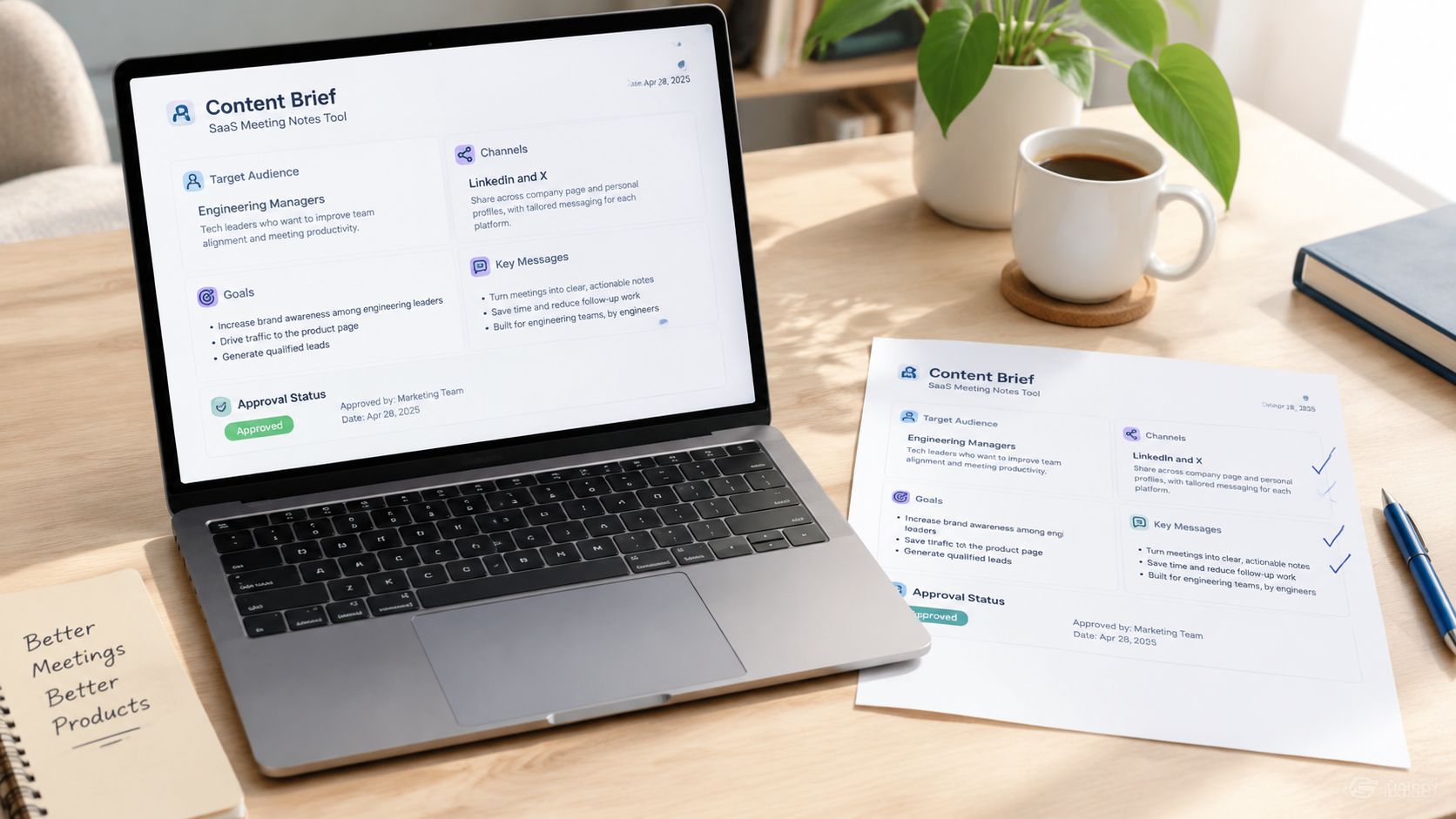
The filled brief reads as follows:
- Campaign and asset ID:
NOTES-LAUNCH, ENG-MGR-01. - Objective and KPI: Generate qualified trial signups from engineering managers. The primary KPI is a completed trial signup through the tracked campaign URL.
- Target audience: Engineering managers and directors at software companies with distributed teams. They need a reliable way to remember decisions from recurring meetings, assign follow-ups, and give absent teammates useful context.
- Channel and format: LinkedIn uses a document post with several product screens and a concise explanatory caption. X uses a thread covering the problem, decision workflow, and trial CTA.
- Core message: Meeting notes become operational when they connect decisions to owners and follow-ups.
- Supporting points: The product captures decisions during meetings, turns follow-ups into assigned actions, and creates a searchable record for teammates who were not present.
- Tone and voice: Calm, practical, precise, and confident. Use short sentences. Avoid exaggerated claims, startup clichés, and fear-based language.
- Mandatory terms and banned claims: Include “meeting notes,” “engineering managers,” and “decision log.” Do not use “guaranteed,” “zero meetings,” or unsupported claims about team productivity.
- CTA and links:
Start a trialpoints to a campaign-tagged signup URL. LinkedIn and X use separate tracked destinations for channel-level review. - Visual direction: Use an approved interface screenshot showing a decision, owner, and follow-up. Apply the product palette, large readable labels, and no decorative stock imagery.
- Compliance notes: Remove customer information from screenshots. Use approved interface states only. Product marketing must confirm that every displayed capability is available at launch.
- Owner: Content operations lead.
- Reviewers: Product marketing checks capability accuracy, brand checks voice and visual fit, and legal reviews any introduced claim or customer reference.
- Deadline: Final approval before the product launch publishing window.
- Approval status: Draft, awaiting product marketing review.
The brief resolves the first dispute by making decision visibility the core message and positioning productivity as an indirect benefit. It resolves the second by defining LinkedIn and X as separate formats within one campaign. The strategy remains shared, while each channel gets copy and structure suited to its publishing constraints. That distinction gives the writer room to execute without reopening the campaign's main decisions.
Adapting the Template for Different Team Scenarios
A useful template has a stable spine and flexible operating detail. The objective, audience, core message, and CTA should survive every context. Ownership and review fields change because the number of people involved changes.
| Field | Solo Founder | In-House Team | Agency | Multi-Channel Launch |
|---|---|---|---|---|
| Objective and KPI | Required, one outcome | Required, linked to campaign goal | Required, tied to client outcome | Parent KPI plus channel signals |
| Audience | Short persona | Full persona and funnel context | Client-approved persona | Shared audience with channel nuances |
| Owner | Founder | Named internal owner | Account or delivery owner | Parent owner and child owners |
| Legal review | Usually optional | Flag required | Client approval required | Channel-specific review where needed |
| Revision rules | Informal | Internal review state | Contract reference and revision rounds | Parent and child version history |
| Approval status | Founder approval | Brand or legal gate | Client approval gate | No publish until relevant child is green |
Solo founder
Compress the document to objective, audience, channel, core message, and CTA. Stakeholder approval fields can become optional, but the success metric can't disappear. The common failure is publishing frequently without deciding what a successful asset should produce.
In-house team
Keep the full template. Add a named owner, a legal review flag, and a link to the brand voice source. Internal teams often skip the legal field because everyone assumes someone else knows the rule. That assumption becomes expensive when a draft reaches publication without a documented clearance path.
Agency
Add client name, contract reference, revision rounds, and invoice trigger. The agency version should also distinguish client feedback from internal edits, so a change request doesn't expand the delivery scope. Teams managing several accounts can use a structured approach to managing client accounts alongside the brief, but the approval state still belongs on each asset.
Multi-channel launch
Use a parent brief for the campaign decision, audience, message, and shared compliance rules. Create child briefs for each network, format, visual treatment, CTA destination, and reviewer. The failure mode is copying the parent into every channel and losing the specific constraints that determine whether each asset works.
Approval Workflow, Deadlines, and Freshness Built Into the Brief
A publishing deadline is incomplete without decision gates. Put the first review within 24 hours of brief creation, finish legal and brand sign-off within 48 hours, and assign a freshness check at 30 days for evergreen content or 7 days for trend-driven posts, following the operating policy.
Keep each deadline beside the owner and reviewers. The brief should show the approver's name, approval timestamp, current version, and approval state. That record prevents reviewers from approving an older copy pulled from a message thread.
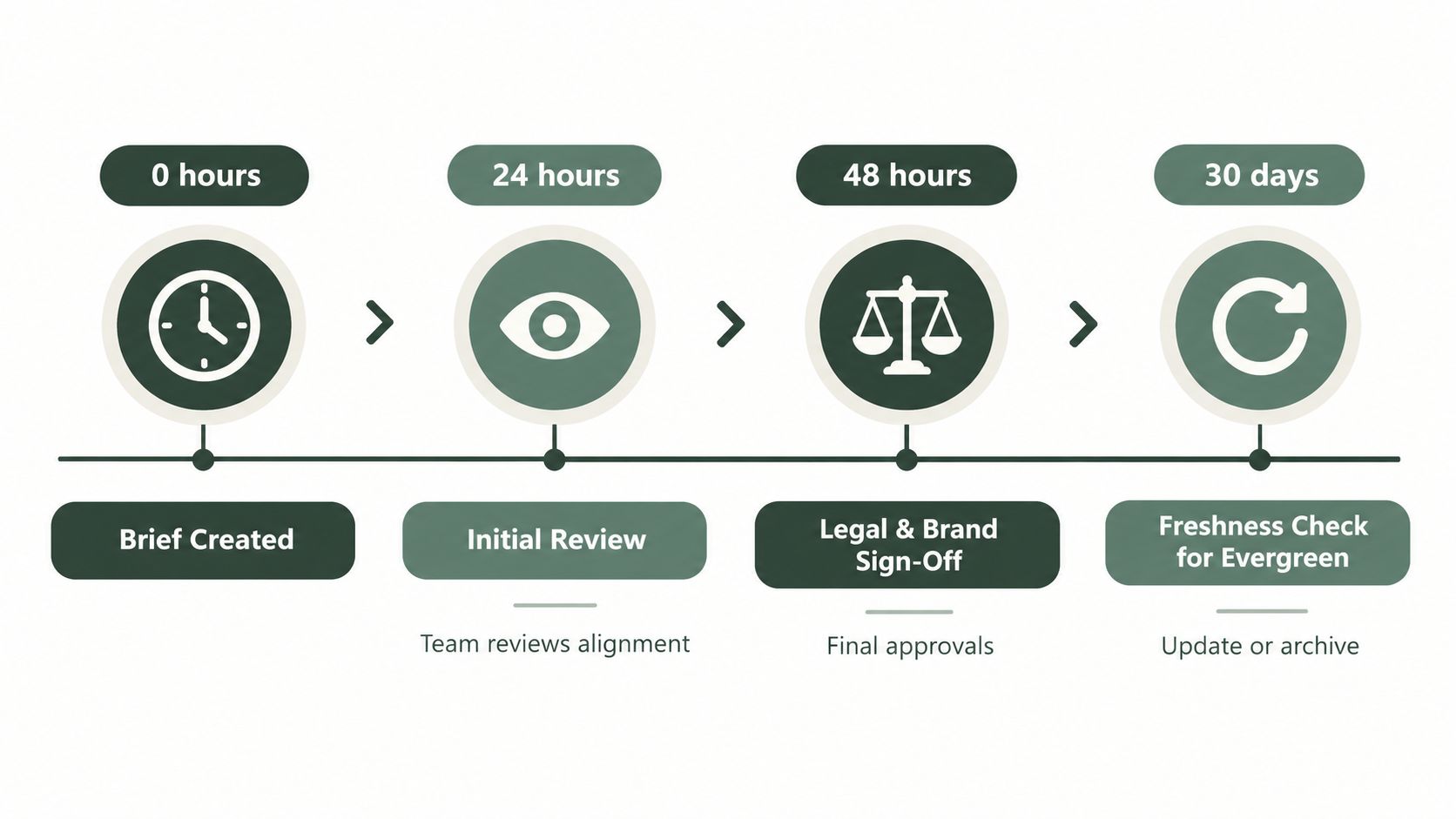
Use the workflow as a set of explicit gates:
- Brief created: The owner completes required fields and marks unresolved decisions.
- Initial review: The team checks the objective, audience, channel fit, brand voice, legal flags, and measurement plan.
- Final sign-off: Named brand and legal reviewers approve the actual draft against the current brief.
- Freshness check: The owner verifies that facts, links, product claims, screenshots, and channel assumptions remain valid.
Approval speed requires a realistic constraint. One workflow reference reports an average approval process at eight days, while practical guidance recommends keeping most review windows to 24 to 48 hours unless legal or compliance requires more time (approval workflow benchmarks). The delay usually starts with unclear ownership, unrestricted feedback, or a draft without a defined decision gate.
Set a staleness rule: a brief untouched for 30 days must be re-briefed before production resumes. Confirm its objective, audience, channel, voice, claims, links, and measurement plan. Publication remains blocked until the approval state is green.
For teams formalizing review responsibilities, this content approval process guide can serve as a separate operating reference. The brief remains the controlling record, keeping approval history attached to the asset instead of scattered across project tools.
How an Autonomous AI Agent Ingests the Same Brief End to End
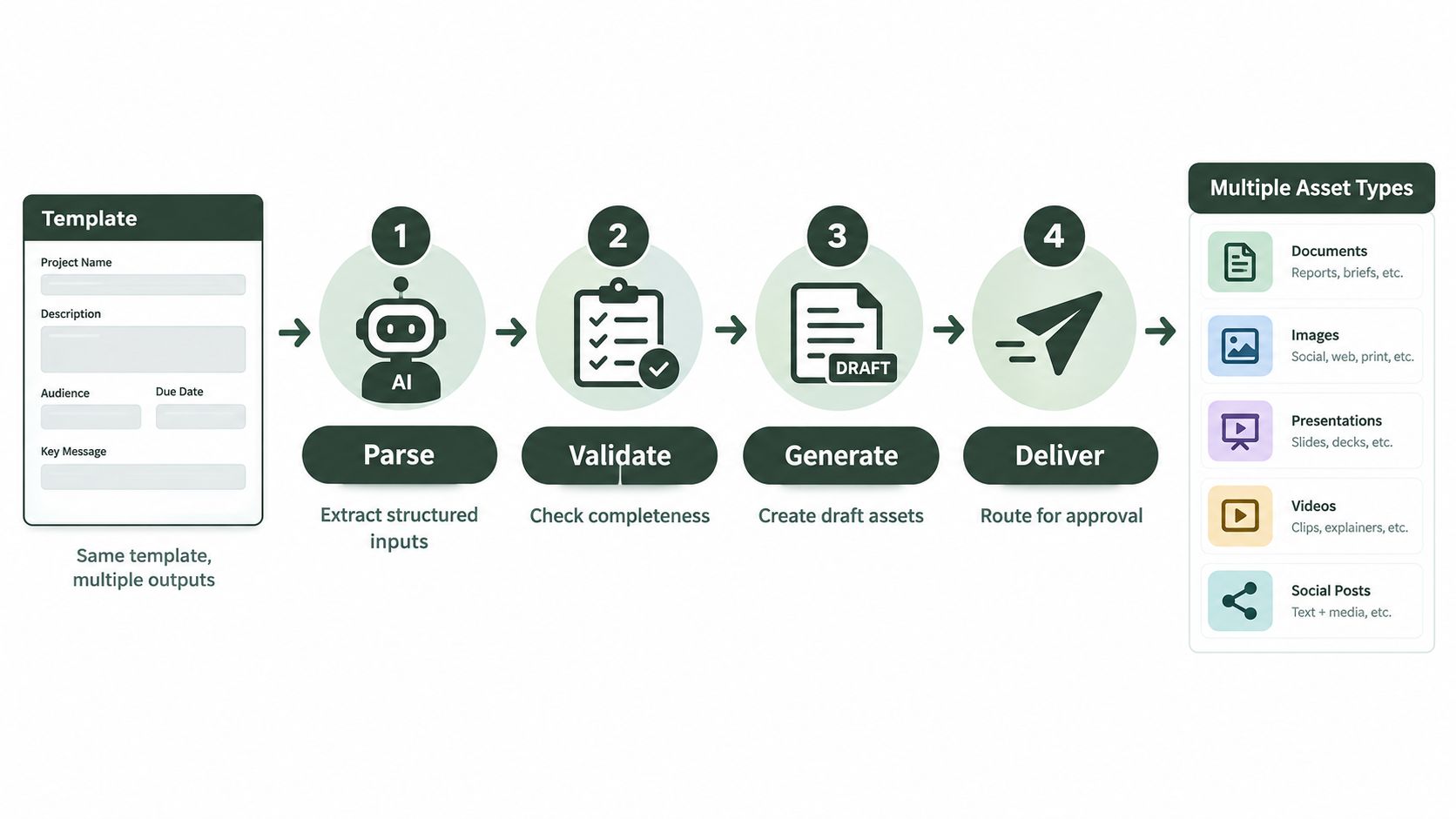
An autonomous AI agent should consume the approved schema, not a second version written for automation. When the fields remain consistent, the agent can parse the objective, audience, channels, message, visual direction, compliance rules, owners, and approval state without asking the team to translate strategy into prompts.
Parse, validate, generate, deliver
Parse turns the brief into structured inputs. The agent identifies the campaign, asset type, platform constraints, CTA destination, mandatory terms, banned claims, and source references.
Validate checks that required fields exist and that the brief isn't stale. A missing audience, undefined KPI, expired approval, or old compliance note should pause the workflow rather than produce a confident but misaligned draft.
Generate creates channel-specific copy and visual instructions against the same core message. A LinkedIn asset can receive a document-post treatment while an X asset receives a thread structure, without changing the campaign objective.
Deliver routes drafts back into the brief with version history. The record should show which brief version produced the draft, which sources were used, what changed, and who must review it.
The agent also needs explicit decision points. If the legal flag is active, route the draft to the named legal reviewer. If the freshness timestamp exceeds the stated threshold, escalate for a re-brief. If the brief contains conflicting CTAs or unsupported claims, pause and request human input. Human approval remains the publishing gate, so no agent action should publish while the status is not green.
This is the same principle used in careful automation for tasks such as a freelance email management tool: structured inputs, controlled actions, and escalation when a person needs to decide. Crowbert can accept voice, image, or text briefs in its dashboard or through its connected messaging workflow, then use the brief as the starting point for drafting, scheduling, publishing, engagement, and reporting with human approval retained.
Teams evaluating an agent workflow should also understand AI agent orchestration platforms as an architectural question. The important test isn't whether an agent can generate text. It's whether it can preserve the brief, route exceptions, maintain an audit trail, and stop before publication when a human decision is required.
Copy-Ready Checklist and Frequently Asked Questions
Copy this checklist into your workspace:
- Pre-write: Confirm campaign ID, objective, single KPI, audience, channel, format, core message, supporting points, voice, keywords, banned claims, CTA, links, visuals, sources, owner, reviewers, deadline, and approval state.
- Post-write: Check message alignment, audience relevance, channel format, voice, required terms, link destination, source accuracy, visual permissions, and version history.
- Pre-publish: Confirm legal and brand clearance, approval timestamp, green status, current links, correct channel settings, and freshness date.
How long should a brief be for each channel?
Length should follow execution complexity, not a universal word count. A single organic post may need only the core fields, while a multi-format launch needs channel-specific child briefs, visual direction, links, and separate reviewers.
What should I do when the strategy is unclear?
Stop before drafting and mark the unresolved decision in the objective, audience, or core message field. A writer or agent can improve execution, but neither should choose the business goal.
How should organic and paid content share one brief?
Use one parent brief for the audience, proposition, core message, and compliance rules. Add child sections for paid targeting, creative variants, budgets, landing destinations, and approval requirements, so shared strategy doesn't erase channel-specific execution.
How do I version and archive briefs?
Assign a stable campaign and asset ID, then record each approved revision with its timestamp, owner, and status. Archive superseded versions instead of overwriting them, because the audit trail explains why the published asset looks different from the original plan.
Does an AI agent need a separate brief?
No. A well-structured content briefing template can serve both people and an autonomous agent. The agent needs explicit field types, required-field validation, approval states, freshness rules, and escalation paths, not a second strategy document.
Crowbert gives teams an autonomous AI agent that can take a structured brief from idea through channel-aware drafting, visuals, scheduling, publishing, engagement, and reporting while keeping human approval in control. Visit Crowbert to see how the same brief can become an end-to-end social media workflow instead of another document waiting for a handoff.
About the Author
The team behind Crowbert building AI-powered marketing tools that help businesses of all sizes create professional campaigns, manage social presence, and drive real results.