Automating Repetitive Tasks Without Breaking What Works
A practical guide to automating repetitive tasks with a stable framework, governance guardrails, and real social media workflow examples for 2026.
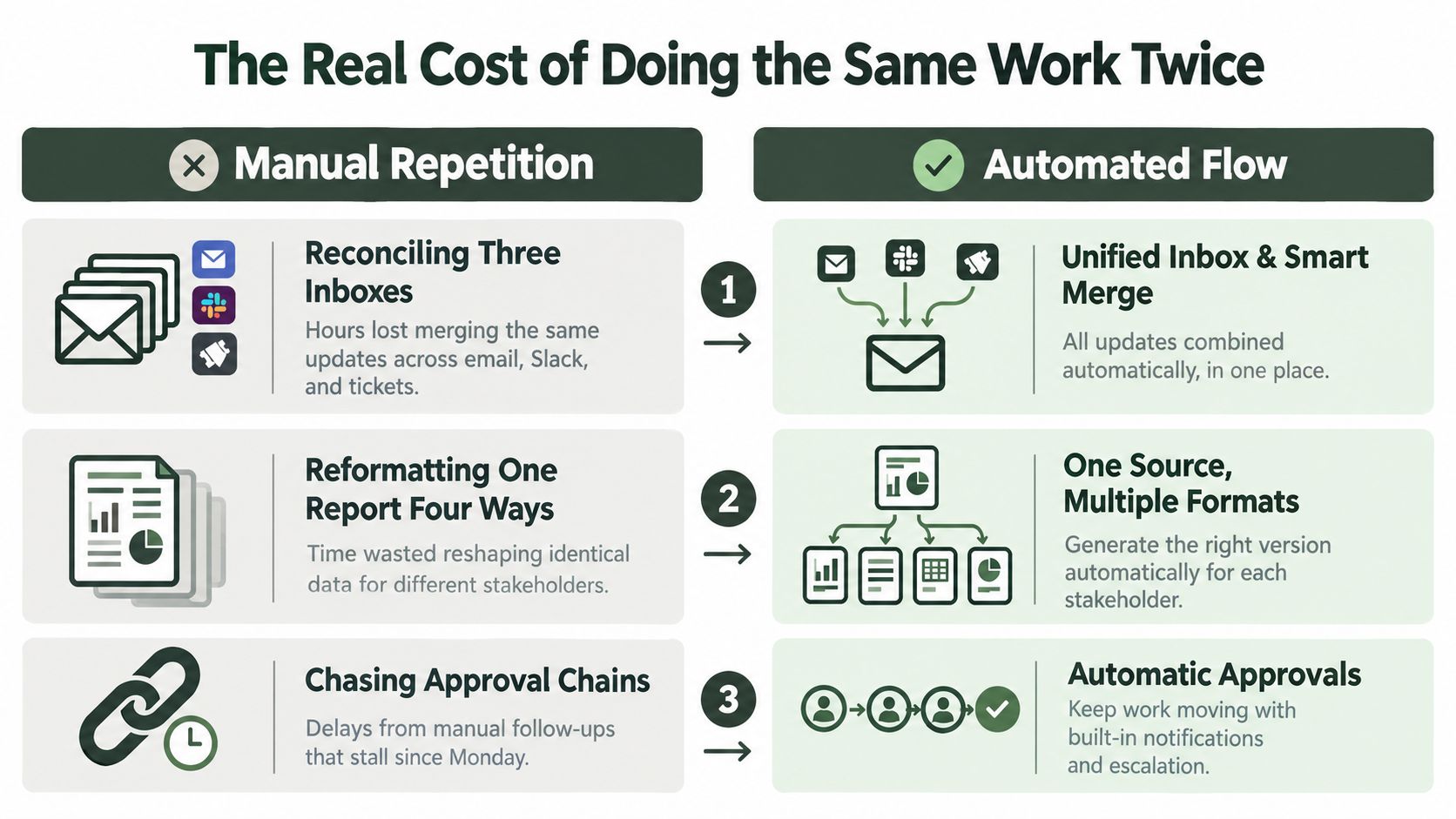
Tuesday starts with work that should already be finished. An operations lead reconciles three inboxes, reformats one report into several layouts, and follows an approval chain that began the day before. None of these tasks requires much judgment in isolation, but together they consume the same attention needed for planning, customer conversations, creative decisions, and risk review.
That's the case for automating repetitive tasks. The objective isn't to make a task run faster. It's to stop spending human judgment on execution residue, while keeping people responsible for decisions that affect customers, reputation, and revenue.
Table of Contents
The Real Cost of Doing the Same Work Twice
A 20-minute block of post-meeting data wrangling can seem harmless. Repeated five times in a week, it takes 100 minutes from a 90-minute strategic block, leaving that block fragmented before the actual work begins. The loss isn't just the time spent copying fields. It's the context switching, the rechecking, and the delay before someone can make a decision.
The same pattern appears in social operations. A manager exports platform data, cleans inconsistent labels, turns the results into a client update, asks for approval, and then manually schedules the approved posts. The activity feels productive because something is always moving, but the manager's calendar fills with coordination rather than judgment.
Busywork and coordination debt
Some repetitive work is merely tedious. Reformatting a file or moving a standard attachment between folders usually has a clear endpoint. Coordination work is more expensive because it creates waiting:
- Approval chasing: A person checks whether someone has reviewed a draft, sends a reminder, and updates another system.
- Status reconciliation: A manager compares different versions of the same information across inboxes, tickets, and spreadsheets.
- Exception recovery: A missed field or failed handoff forces someone to retrace the workflow and determine what happened.
A practical guide to save time on routine jobs is useful for identifying these small drains, but selection still matters. Automating every irritation creates more systems to maintain. The better target is work that repeatedly consumes attention without requiring meaningful discretion.
For a social team, that might mean documenting the cost of creating one channel-specific post from an approved campaign brief. The right baseline includes drafting, formatting, routing, scheduling, checking, and correcting. Crowbert's overview of social media management cost can help frame that broader operating cost before a team decides what to automate.
The useful question is no longer, “How quickly can software do this?” Ask instead, “Does this step deserve a human's attention at all?”
A Selection Framework for Tasks Worth Automating
Start with stability, not enthusiasm. A task qualifies for review only when the underlying process hasn't changed in the last 60 days and a written runbook exists. If the team is still changing the steps, automating them will preserve uncertainty in a faster and less visible form.
Score each candidate against four criteria. Give each category a rating from 1 to 3, for a maximum of 12 points.
| Criterion | 1 point | 2 points | 3 points |
|---|---|---|---|
| Frequency | Occasional | Recurring | Frequent and predictable |
| Rule clarity | Judgment-heavy | Mixed rules and judgment | Clear decision rules |
| Error cost | Easy to correct | Causes rework | Creates material risk or delay |
| Reversibility | Hard to undo | Partly reversible | Easy to review or roll back |
Candidates scoring 9 or higher proceed to design. Scores from 6 to 8 enter a stability extension period, where the team documents exceptions and watches for process changes. Scores below 6 stay manual until the workflow becomes clearer or more repeatable.
Applying the scorecard
Consider three common candidates:
- Meeting note distribution: It may be frequent and easy to trigger, but the content can contain ambiguous owners or sensitive context. It's a reasonable candidate only when the team has a fixed note format and a reliable approval step.
- Weekly KPI digest: The source fields, calculation rules, and audience can be documented. Because the output is reviewable before distribution, this often earns a strong score.
- Client onboarding document generation: The task may recur frequently, but client-specific terms and missing information create exceptions. It usually needs a stability extension before full automation.
The framework aligns with the broader discipline of documenting a real process, measuring a baseline, and checking stability before building. Workflow automation projects commonly fail when teams automate a process that is broken or still changing, with industry estimates placing failure rates broadly between 30% and 70%, depending on the study, as discussed in this workflow automation failure analysis.
A 30-minute review checklist
Use one short review to test a shortlist:
- Confirm stability: Has the process stayed materially unchanged for 60 days?
- Find the runbook: Can another team member follow the documented steps?
- Count exceptions: Which cases require judgment or escalation?
- Define the owner: Who approves changes and handles failures?
- Score the candidate: Apply the four criteria and record the total.
- Choose the disposition: Proceed at 9 or higher, extend stability at 6 to 8, or keep manual below 6.
For a broader distinction between task automation and more coordinated systems, see Crowbert's explanation of what marketing automation is. The important boundary remains the same: automate execution only after the decision rules are understood.
What Automation Actually Returns in Numbers
Benchmarks provide a planning range, not a promise for every workflow. A widely cited productivity benchmark reports that 94% of companies still perform repetitive, time-consuming tasks, while automation has improved jobs for 90% of knowledge workers and productivity for 66% of them. The same benchmark reports that 36% of organizations were already using business process management software, and 50% of business leaders planned to automate more repetitive work, according to workflow automation statistics and trends.
The benchmark also estimates 25% to 30% productivity gains in automated processes, 40% to 75% error reduction compared with manual processing, and ROI within 12 months for 60% of implementations. Those figures support a sensible expectation: automation can produce measurable returns, but only when the process is bounded and the team measures failure recovery as carefully as speed.
| Metric | Manual Execution | After Automation |
|---|---|---|
| Average minutes per cycle | Record your current median | Record the post-launch median |
| Monthly error rate | Record missed fields, wrong versions, and failed handoffs | Compare the same error definition |
| Hours reclaimed per quarter | Include execution, follow-up, and rework | Subtract monitoring and recovery time |
| Payback period in weeks | Establish implementation and operating cost | Track until recovered value exceeds cost |
For structured, rule-based work, traditional robotic process automation can reach 95% to 99% accuracy, while unstructured workflows can fall below 50% without custom artificial intelligence support, according to enterprise automation benchmarks summarized by AI agents and workflow automation platforms. That difference is why a low-judgment reporting step can outperform a more ambitious creative workflow, even when the creative workflow appears more valuable.
The common mistake is counting only speed. A broken run can erase the apparent saving when someone has to inspect outputs, restore missing data, and explain the error to a client. Before approving a project, fill in the table with your own baseline and define what a failure costs. Crowbert's guide to measuring social media success offers a useful model for separating activity metrics from outcome measures.
Sequencing Automations When Everything Feels Urgent
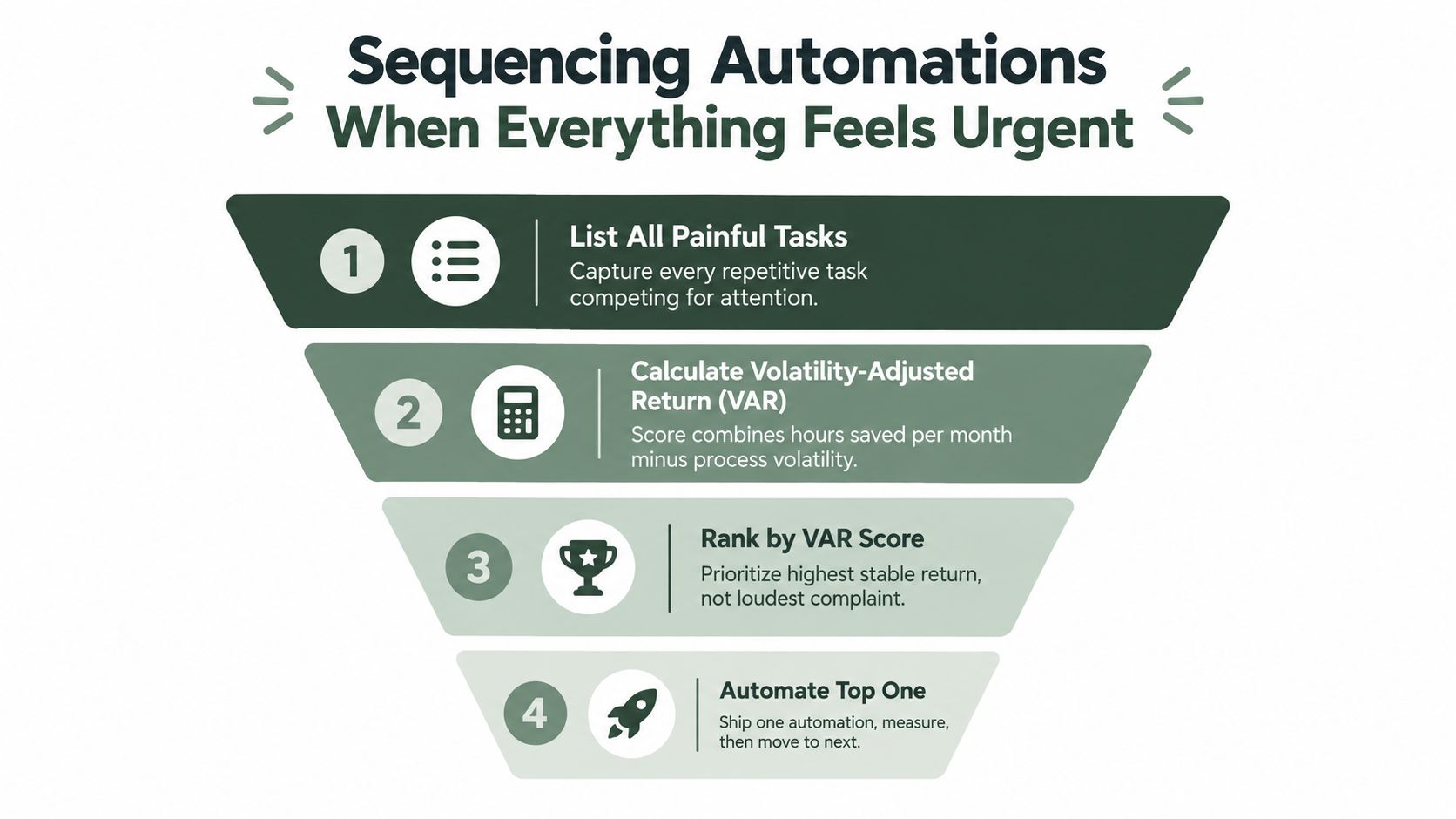
When every task feels painful, teams usually choose the loudest complaint. That approach favors visibility over return. A better order uses a Volatility-Adjusted Return, or VAR, to balance the hours a workflow could reclaim against its error reduction and process instability.
A practical version is:
VAR = hours saved per month + expected error reduction, minus a stability penalty for processes that changed in the last 90 days.
You don't need false precision. Use a simple score, document the assumptions, and apply the same method to every candidate. A task that saves substantial time but changes every few weeks may rank below a quieter workflow that runs predictably and feeds several downstream steps.
Three waves of delivery
Stabilize first. Freeze the process long enough to document the current path, name an owner, and record exceptions. If the team is redesigning the workflow, automation should wait.
Automate second. Build one narrow path with explicit triggers, inputs, outputs, and approval conditions. Ship the smallest useful version, then observe its behavior before adding branches.
Optimize third. Adjust thresholds, prompts, retry rules, and routing after real runs expose weak points. Optimization should improve a known workflow, not compensate for an undefined one.
This sequence also protects dependencies. If a content brief feeds a publishing queue, stabilize the brief before automating the queue. Otherwise, the downstream automation will amplify inconsistent inputs and make diagnosis harder.
The same principle applies to organizational adoption. A practical change management automation guide can help teams assign ownership and communicate process changes, but no change plan can rescue a workflow with unclear rules.
For social operations, an AI agent orchestration platform is relevant when several specialized steps must coordinate. Even then, begin with one bounded workflow, maintain an approval boundary, and make the handoff between stages visible.
Three Social Media Workflows You Can Hand Off
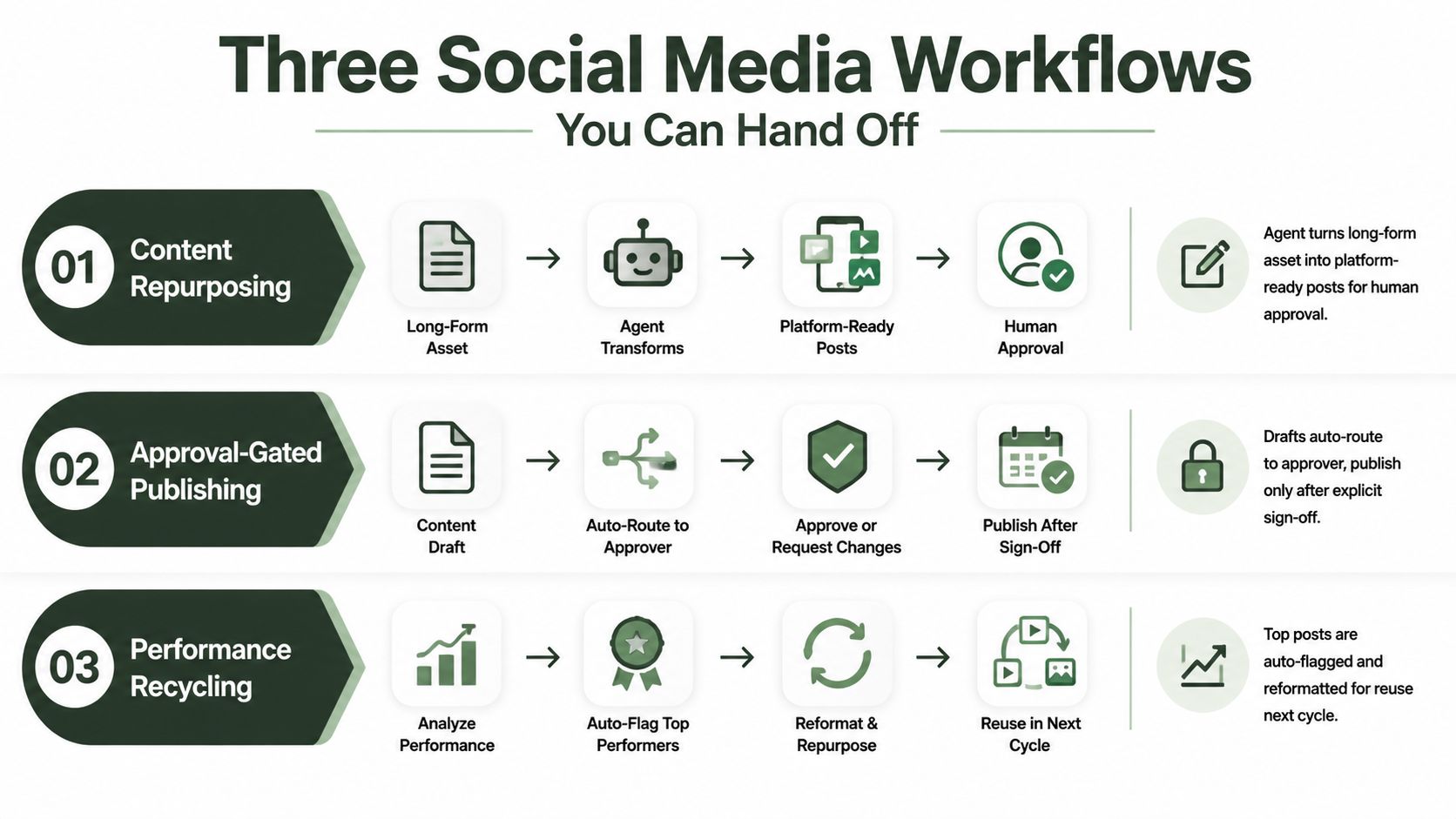
Social media work contains both repeatable execution and high-consequence judgment. The useful pattern is to let an autonomous agent handle the production chain, while a person controls approvals, exceptions, and brand-sensitive decisions.
Content repurposing
Trigger: A long-form article, webinar transcript, product update, or approved campaign brief enters the content workspace.
Agent actions: The agent extracts the main claims, proposes platform-native variations, adapts length and formatting, suggests media treatments, and places each draft in the review queue. The workflow should preserve the source reference so an editor can check whether a claim has been stretched or removed from context.
Approval gate: An editor reviews the drafts, confirms the call to action, checks brand language, and approves individual channels rather than accepting the entire batch blindly.
Human ownership: The editor still decides whether the idea belongs on a particular channel, whether the tone is appropriate, and whether the source supports the proposed wording. Crowbert's AI social media assistant fits this pattern by supporting content creation and execution while retaining explicit human approval before publishing.
Community triage
Trigger: A comment, direct message, mention, or reply arrives through a connected channel.
Agent actions: The agent classifies the message by intent, sentiment, urgency, and risk. It can group routine questions, identify possible complaints, draft responses from approved guidance, and route sensitive messages to the correct owner.
Approval gate: A human approves every response that involves refunds, legal issues, safety concerns, private customer information, or reputational risk. Routine drafts can remain in a queue until an authorized person sends them.
Human ownership: The team decides what the brand is willing to say and when a conversation moves to a private support channel. The agent should never invent policy to fill a gap in the knowledge base.
Performance reporting
Trigger: The reporting period closes or a scheduled analytics job runs.
Agent actions: The agent pulls approved metrics, checks for missing data, compares results with the team's baseline, flags unusual movement, and generates a concise narrative. It can then identify posts worth adapting for a future cycle.
Approval gate: The manager verifies the source data and accepts, edits, or rejects the interpretation before the report reaches a client or leadership group.
Human ownership: The manager decides what the results mean for strategy. A high-performing post may have succeeded because of timing, topic, audience, or an external event. The agent can surface the pattern, but it shouldn't turn correlation into certainty.
A workable design makes the trigger, actions, approval, and ownership explicit. That structure keeps automation end to end without treating human judgment as an obstacle.
The Maintenance Burden Nobody Budgets For
Launch day is the easiest day to make an automation look successful. The inputs are known, the test data is clean, and everyone is watching the run. The harder work starts when an upstream field changes, an authorization scope expires, a rate limit shifts, or a team member edits the copy that the workflow expects.
Automation creates an ongoing engineering and governance workload. Empirical work examining GitHub Actions found that workflow files in nearly 200 mature projects changed repeatedly over time, showing that operational workflows evolve rather than remain fixed, as documented in this study of workflow maintenance. The lesson applies beyond software repositories. A social publishing workflow also needs ownership, review, and controlled changes.
Three forms of drift
- Integration drift: A connected service changes a field, permission, endpoint, or delivery behavior. The workflow may fail loudly, or it may continue while passing incomplete data.
- Rule decay: Brand guidance, campaign priorities, or approval policies change. A prompt that worked last quarter can produce drafts that no longer fit the organization.
- Silent failure: A trigger stops firing while the dashboard remains green. Nothing alerts the owner because the system is reporting health, not business activity.
Budget maintenance as a standing operating responsibility rather than an emergency task. Store versioned configurations, record meaningful changes, schedule audits, and assign one owner per workflow. That owner doesn't need to perform every repair, but someone must be accountable for knowing whether the automation still reflects the current process.
A pre-shipping maintenance checklist
Before launch, document:
- The expected input: Define the required fields, source, and acceptable formats.
- The successful output: Save an example that reviewers can compare against later runs.
- The failure route: State who receives an alert and what happens when the workflow stops.
- The change record: Keep revisions, approvals, and rollback decisions in one location.
- The review date: Set a recurring audit rather than waiting for a visible incident.
The system is not finished when it runs once. It's finished when the team knows how to detect drift, correct it, and decide whether the workflow should continue.
Governance, Approval, and Verifying It Still Works
Governance becomes practical when every automation has a named owner, a revision log, and an escalation path. Without those three elements, “human approval” can become a vague promise that no one can enforce when a queue grows or an exception arrives.
Use three verification layers. Each catches a different class of failure.
Validate inputs before execution
Check the shape and source of incoming data before the agent acts. For a social post, that might mean confirming the channel, campaign, media reference, approval status, and required disclosure fields. Reject incomplete inputs rather than allowing the workflow to improvise.
Sample outputs after execution
Review a randomized 5% to 10% slice each week for workflows that produce customer-facing content. The sample should cover different channels, content types, and exception paths. Reviewers should record whether the output was accurate, on-brand, correctly routed, and safe to publish.
Monitor behavior against a baseline
Set alerts for changes in confidence, volume, latency, or failure frequency. A sudden drop in output volume may indicate a broken trigger. A sudden increase may indicate duplicate events. A latency change can reveal a dependency problem before users report it.
Keep certain checkpoints mandatory: sensitive customer replies, claims that require substantiation, legal or safety-related content, and any publication that lacks explicit authorization. Once an automation has demonstrated stable behavior for more than 30 days, some low-risk reviews can move to asynchronous sampling. That change should be earned through evidence, not granted because the queue is inconvenient.
Before launch, verify credential scoping, prepare a rollback runbook, enable an audit trail, and test a kill switch. Also re-test dormant workflows before reactivating them. A workflow that hasn't run recently may depend on inputs, permissions, or rules that have changed while it was idle.
Crowbert provides an autonomous AI agent for social media work across content creation, scheduling, publishing, engagement, and performance reporting, with explicit human approval before posts go live. Visit Crowbert to see whether its approval-gated workflows fit the repetitive publishing and reporting tasks your team is ready to hand off.
Frequently Asked Questions
What repetitive tasks are safest to automate?
Start with frequent, rule-based, reversible work that has a stable process and a written runbook. Examples include routing approved content, generating standard reports, and preparing drafts for review. Avoid automating workflows that are still changing or depend on undocumented judgment.
Does automation always save time?
No. The time saved in execution can be offset by integration work, data cleanup, monitoring, training, compliance review, and recovery from failed runs. Measure the full operating cost, including maintenance and exception handling, before declaring a gain.
Should an autonomous agent publish social media posts without approval?
For customer-facing social content, keep explicit approval as the default. An agent can draft, format, schedule, route, and report end to end, while a human remains responsible for brand-sensitive decisions, claims, customer risk, and final publication.
How do teams prevent automation from becoming brittle?
Assign one owner, version configurations, validate inputs, sample outputs, monitor behavior, and maintain a rollback path. Treat every workflow as maintained infrastructure rather than a one-time setup.
When should a team stop automating a task?
Stop or redesign the workflow when exceptions dominate, inputs remain unstable, failure recovery costs exceed the value returned, or no qualified owner can maintain it. Manual work is preferable to a fast process that creates hidden operational risk.
About the Author
The team behind Crowbert building AI-powered marketing tools that help businesses of all sizes create professional campaigns, manage social presence, and drive real results.