How to Search Tweets on Twitter Using Advanced Operators
Learn how to search tweets on Twitter using advanced operators, date filters, and engagement metrics to find exact conversations and monitor brand mentions.

You're probably here because a normal X search gave you exactly what it gives everyone else. Too much noise, too little control, and very little confidence that you're seeing the right posts for the right time window.
That's the gap between casual browsing and actual research. If you need to monitor brand mentions, pull campaign reactions from a specific day, or find posts from one account without scrolling for ages, you need operator-based search. That's the answer to how to search tweets on Twitter with precision instead of hope.
Table of Contents
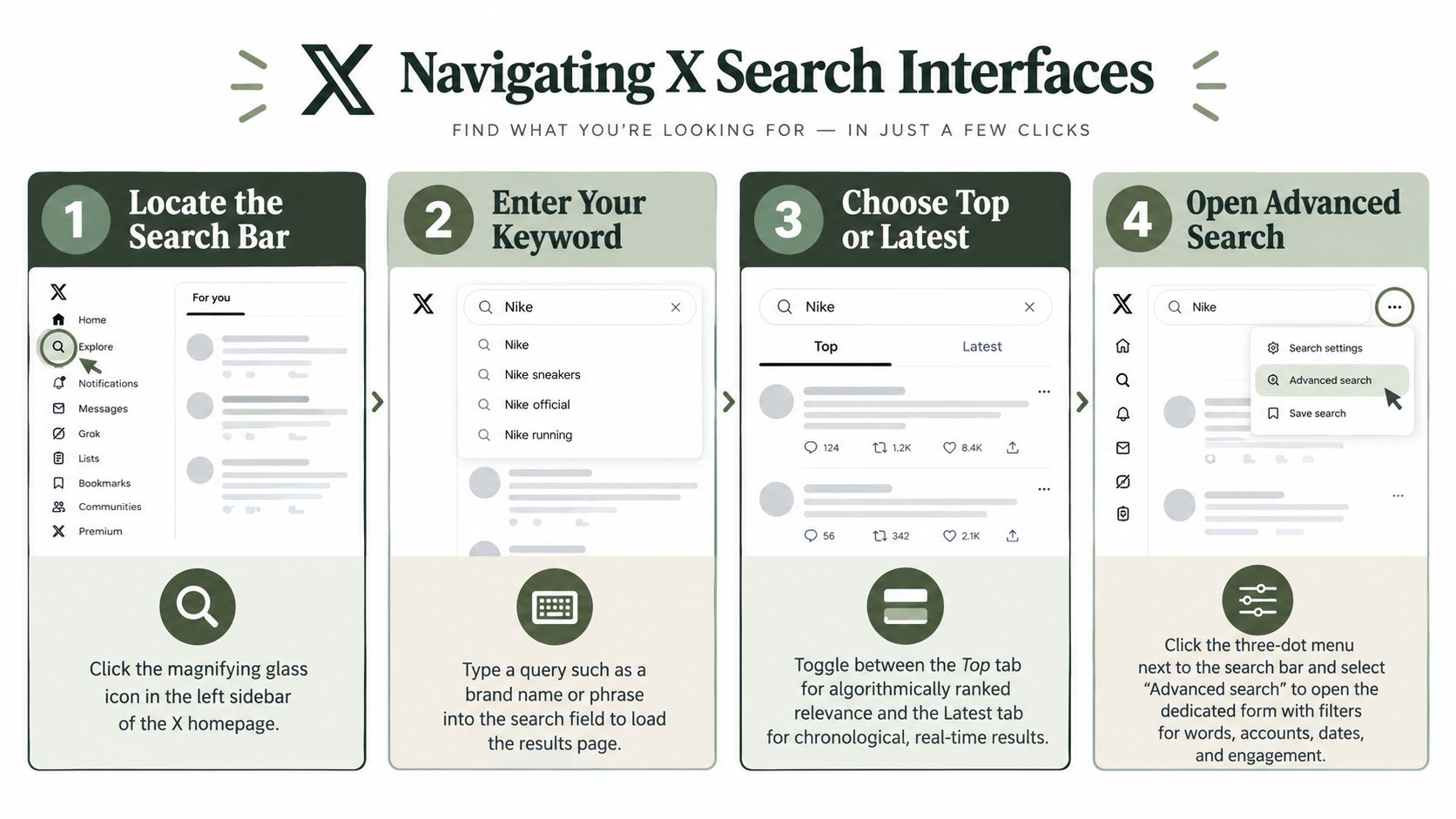
Navigating the Basic and Advanced Search Interfaces
Starting in the main search bar, typing a product name or phrase, and accepting whatever the platform returns works for broad discovery. It fails when you need a clean view of replies, historical posts, or conversation spikes tied to a specific date.
The first split to understand is Top versus Latest. Top is relevance-ranked. Latest is chronological. If you're monitoring a live event, product issue, or launch reaction, Latest is usually the better first pass because it strips away some of the ranking logic and shows you what people are posting now.
Where the advanced form lives
X supports advanced tweet search in two ways. You can type operators directly into the search bar, or you can use the dedicated Advanced Search interface on the web. The documented workflow is straightforward. Enter a query, go to the results page, open Advanced search, fill in fields for words, accounts, dates, engagement thresholds, and filters, then run the search using a more targeted query pattern, as outlined in this operator guide.
If you're managing X as a channel inside a broader workflow, it helps to keep platform-specific execution documented alongside publishing and response processes. That's especially true for teams already handling X workflows in Crowbert.
Why plain keyword search breaks down
A raw keyword query often mixes:
- Unrelated mentions that share the same word but not the same topic
- Old and new contexts without clear date boundaries
- Replies, reposts, and quotes that muddy the original signal
- Different spellings that force you to rerun the same search manually
The desktop advanced form is useful when you don't want to memorize syntax. Mobile is less friendly. If you need a practical workaround, this guide to advanced search for mobile is worth keeping handy because most serious mobile searching still depends on operator entry rather than a full desktop-style interface.
Building Precise Queries with Search Operators
Operator syntax is what turns search from browsing into retrieval. X's official documentation still supports query building with terms like OR, from:, to:, since:, until:, and exclusion forms such as -is:retweet and -is:reply in its search operators documentation. That matters because the search system isn't just matching words. It's parsing structure.
The operator combinations that do real work
The biggest improvement comes from stacking filters in one line instead of running several separate searches.
A few examples:
from:brandname "shipping delay"finds posts from one account using an exact phrase.to:brandname refund -is:retweetnarrows to direct replies or addressed posts, minus repost clutter.(BrandName OR "Brand Name") -is:replycatches spelling variations while excluding replies.brandname lang:en filter:linksisolates English-language posts that include links.from:ceo_handle since:2026-01-01 until:2026-02-01 is:replypulls a specific class of posts from a fixed window.
If you work with campaign tagging, it also helps to understand how hashtags function as retrieval shortcuts, not just publishing labels. This short reference on the hashtag is useful when you're deciding whether to search by brand phrase, campaign tag, or both.
Essential X Search Operators
| Operator | Function | Example Syntax |
|---|---|---|
from:username | Finds posts published by one account | from:brandname |
to:username | Finds posts addressed to one account | to:brandname |
OR | Matches either term in one query | brandname OR "brand name" |
since:YYYY-MM-DD | Includes posts on or after a date | launch since:2026-01-01 |
until:YYYY-MM-DD | Limits results before an end date | launch until:2026-02-01 |
lang:xx | Restricts results by language | feature request lang:en |
min_faves:N | Sets a minimum likes threshold | update min_faves:50 |
min_retweets:N | Sets a minimum repost threshold | announcement min_retweets:20 |
filter:replies | Shows replies | brandname filter:replies |
filter:links | Shows posts with links | brandname filter:links |
filter:images | Shows posts with images | campaign filter:images |
is:retweet | Shows reposts | brandname is:retweet |
is:reply | Shows replies | brandname is:reply |
is:quote | Shows quote posts | brandname is:quote |
-is:retweet | Excludes reposts | brandname -is:retweet |
-is:reply | Excludes replies | brandname -is:reply |
What works better than a long keyword list
Many teams overbuild queries by adding every possible brand term at once. That often creates ambiguity instead of coverage. Start with the core term, then add one variable at a time:
- Account filter first when source matters more than topic.
- Date range second when timing matters more than volume.
- Content type third when you need links, images, replies, or quotes.
- Engagement threshold last when you want surfaced winners, not the full conversation.
That order keeps the search explainable. When someone asks why a post appeared in your results, you can answer it from the query itself.
Filtering by Date, Media, and Engagement Thresholds
Date filters are where most otherwise solid searches go wrong. People remember the keyword, remember the account, and still miss the right posts because the time boundary is off by one day.
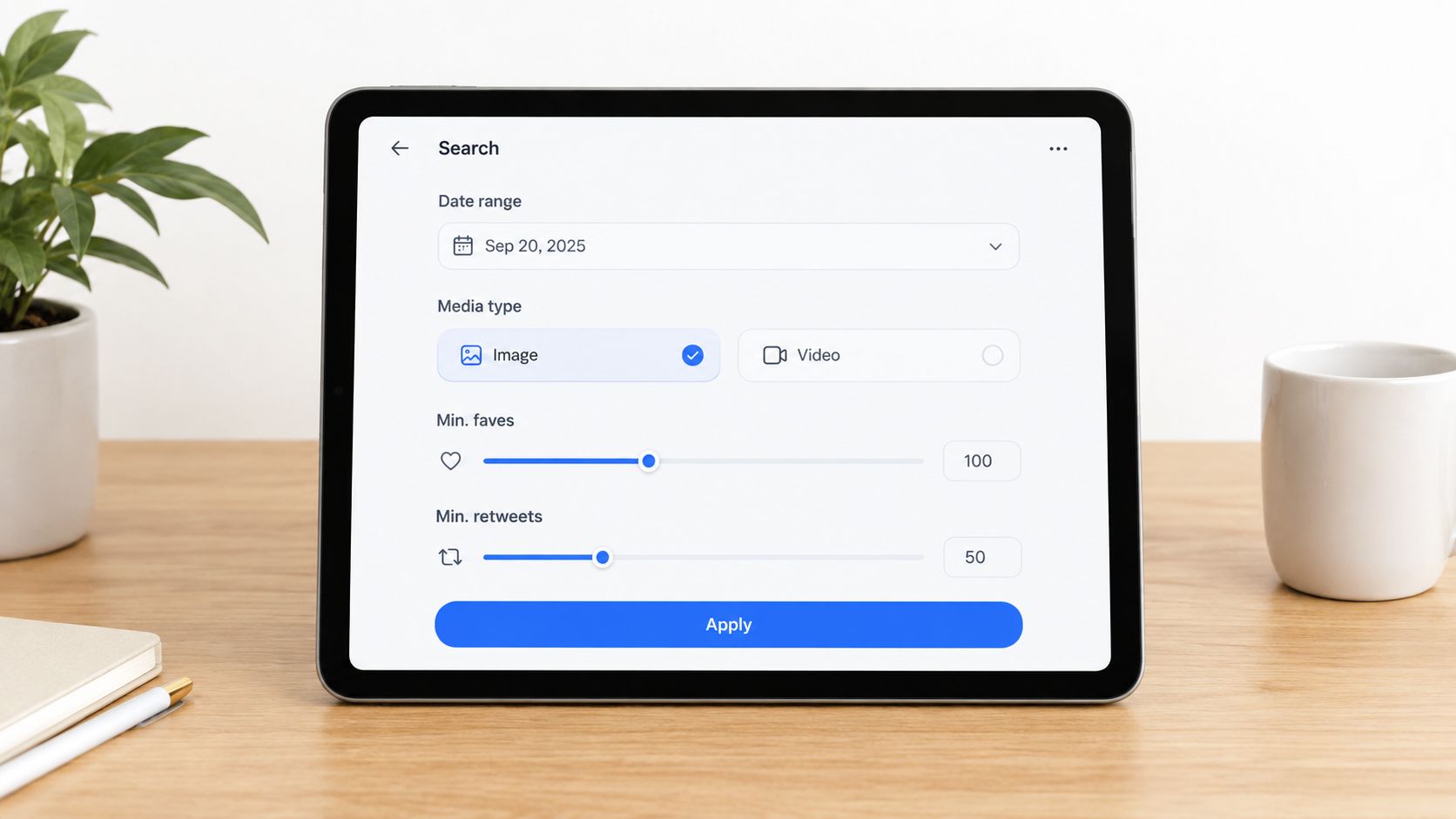
Current search guidance increasingly points out that since:YYYY-MM-DD until:YYYY-MM-DD only isolates a single day if the until date is set to the next day, and that exact formatting matters, as explained in this walkthrough on tweet search by date.
The single-day search pattern
If you want posts from one day only, use:
since:2026-04-10 until:2026-04-11
That returns posts from April 10. Not through April 11. The until boundary is exclusive.
This is the most common error in crisis retrospectives and launch reporting. Teams search since:2026-04-10 until:2026-04-10, get weak results, and assume the posts aren't indexed. Usually the query is the problem.
Media and engagement filters that sharpen results
Once the date range is stable, add content-type and threshold filters to reduce manual review.
Use these patterns:
- Images only with
filter:images - Links only with
filter:links - Replies only with
filter:replies - High-like posts with
min_faves:N - High-repost posts with
min_retweets:N
A practical campaign query might look like this:
("product name" OR #campaigntag) since:2026-04-10 until:2026-04-17 filter:images min_faves:25 -is:retweet
That gives you original image posts about the campaign from a fixed week, with a minimum engagement bar.
If your team reports on response quality, not just volume, you also need to interpret what those filters imply. A threshold doesn't measure quality by itself. It just helps surface posts worth a second look. For teams standardizing review criteria, this definition of engagement rate is a useful baseline.
Three reliable use cases
- Crisis reviewSearch one-day or one-week windows with
filter:repliesand-is:retweetto isolate direct audience response. - Creative analysisAdd
filter:imagesorfilter:linksto identify which content format showed up during a campaign. - Post-event recapUse
min_faves:Normin_retweets:Nto find the posts that shaped public visibility, then inspect them manually for theme and tone.
The X help documentation also notes that advanced search can use the calendar dropdown to set from and to dates, and that it can search posts from any date since the service's first public post, which makes time-based retrieval broader than many users assume in the interface, according to X Help on advanced search.
Automating Monitoring with Saved Searches and AI Agents
Manual search is good for discovery. It's weak for continuity.
Writers eventually arrive at the same problem. They build a strong query, use it for a few days, and then stop checking it consistently because nobody owns the habit. Saved searches help because they preserve the exact syntax, which means you don't need to rebuild your logic every morning.

What saved searches solve and what they don't
Saved searches are useful for recurring checks like:
- Brand monitoring around one product name plus exclusions
- Executive visibility using
from:and mention-based combinations - Campaign watch using a hashtag plus media filters
- Issue tracking using complaint terms plus reply-only filters
They don't give you a complete operating layer. They won't summarize what changed, prioritize risk, draft a response queue, or build a usable snapshot for stakeholders. They also don't convert monitoring into action on their own.
That's where autonomous workflows become more practical than repeated manual search. A dedicated AI agent can monitor recurring query patterns, compile summaries, flag sudden conversation shifts, and prepare response drafts while still keeping a human approval step before anything goes live. If you're evaluating that operating model, this overview of an AI agent for social media lays out how the workflow changes when monitoring, drafting, and reporting are coordinated instead of handled in separate tools.
The operational shift
The upgrade isn't “search, but faster.” It's moving from reactive checking to proactive management.
A mature workflow looks more like this:
- Define a small set of durable queries for mentions, replies, campaign language, and risk terms.
- Review only the deltas instead of rereading the full stream each time.
- Route notable posts into action paths such as response, escalation, or reporting.
- Keep humans on approval, especially for brand-sensitive replies.
For teams extending that logic beyond X, this perspective on monitoring brand presence in AI is useful because discoverability now spans both social feeds and AI-mediated result surfaces.
Overcoming Native Search Limitations and API Ceilings
A query that surfaced 40 relevant posts on Monday can return 400 by Friday, and the search string itself may not be the problem. Native X search is useful for spot checks, but it is not built for repeatable retrieval across large time windows, high-volume topics, or audit-style reporting.
The gap usually shows up when a team tries to answer a precise question twice and gets different practical results. One analyst may find enough posts for a campaign recap in the web interface. Another analyst runs the same query a week later and needs tighter date filters, more manual scrolling, or a different retrieval method. That inconsistency matters if the search is feeding reporting, escalation, or historical research.
Several guides note that the web interface often favors newer results unless you constrain the query carefully. This writeup on searching tweets beyond recent results gives a useful summary of that behavior.
Where the ceiling appears
You usually hit the ceiling in three cases:
- Historical research where the date window matters more than what the interface decides to surface
- High-volume monitoring where one query produces more posts than a person can review reliably
- Structured retrieval where you need exports, reruns, or consistent query handling across teammates
The API boundary is more explicit. X's developer documentation separates recent search from full-archive search. The recent endpoint covers only the last seven days, while full-archive access sits behind higher access tiers, as described in the X API search overview.
That split changes how you plan workflows. For live campaign monitoring, a recent-search window may be enough. For brand incident review, quarterly reporting, or message tracing across older posts, it usually is not.
What to do when native search stops being enough
Use the web interface for fast validation. It works well for checking whether a phrase is appearing right now, whether an account posted on a given day, or whether a narrow operator string is returning the right kind of post.
Switch to archive or API-based retrieval when the job requires repeatability. That includes pulling the same logic every week, reviewing older discussions with exact date boundaries, or collecting enough results that manual scrolling becomes unreliable.
One practical rule helps here. If the question depends on exact coverage, not just directional insight, native search is no longer the right layer on its own.
A quick visual walkthrough can help if you're training teammates on the interface before they move into more structured search methods.
Frequently Asked Questions
Can I search old tweets on X without the API
Yes, sometimes. The X help page says advanced search can search posts from any date since the first public post on the service through its date controls, but practical retrieval in the normal interface can still be uneven, especially if you rely on broad keywords instead of precise operators. For reliable historical searching, use tight account and date filters.
What's the best way to search tweets from one exact day
Use since:YYYY-MM-DD until:YYYY-MM-DD with the until date set to the next day. That's the cleanest way to isolate a single date without missing posts because of the exclusive end boundary.
Does advanced search work on mobile
Operator-based search does. The full desktop-style advanced form is more limited on mobile, so many users enter syntax directly into the search bar when working from a phone.
Why can't I find a tweet I know existed
The post may be deleted, protected, or outside what the default interface is surfacing for your query. Weak syntax is another common cause. Start with from:username, then add one keyword, then add the date window.
How do I embed a tweet after I find it
If your workflow includes reporting or internal documentation, save the URL and add it to your recap or deck. For a cleaner publishing workflow, this guide on how to embed a tweet is a practical reference. For adjacent research habits around discoverability and content retrieval, the Rankingonai.com blog insights are also worth browsing.
Crowbert gives teams an autonomous AI agent that handles social media work end to end with human approval, including drafting, scheduling, engagement support, and reporting across channels. If you want tweet search to feed directly into action instead of staying a manual research task, visit Crowbert.
About the Author
The team behind Crowbert building AI-powered marketing tools that help businesses of all sizes create professional campaigns, manage social presence, and drive real results.